


If you camp or road-trip three or more times a year, or you want internet that survives a power outage at home, buy the Starlink Mini. The kit is $199 in the US, a month of Roam 100GB service is $55, and Standby Mode keeps the dish registered for $10 a month between trips, a fee SpaceX doubled from $5 in 2026. If you will use it for exactly one week this year and never again, rent one: a week runs about $100 plus data, with a $600 deposit. Everything below shows the numbers behind that answer, then the gear that turns a dish on a tripod into usable Wi-Fi inside a cabin.
The short answer
| Your situation | Do this | First-year cost | Every year after |
|---|---|---|---|
| One trip a year, no outage worries | Rent for the week | ~$100 to $150 plus a $600 deposit | Same again |
| Two trips a year | Coin flip: renting is about $100 cheaper over two years, owning leaves a dish at home | $409 to own, $260 to rent | $210 to own, $260 to rent |
| Three or more trips a year | Buy the Mini, park it on Standby | $454 for three trips, $499 for four | $255 for three trips, $300 for four |
| Trips plus outage backup at home | Buy the Mini, park it on Standby | Same as above, and the dish is live at 500 kbps all year | Same as above |
| You need a full-time home connection | Get a Standard 4 X or V5 on Residential instead | $55 to $130 a month for service | Same |
Every price on this page is a US figure as of September 2, 2026, and Starlink changes prices and plan rules without notice, sometimes more than once a season. Before you order, check the current numbers on starlink.com/service-plans and the kit price in your own checkout; if this page and Starlink disagree, Starlink is right.
What a Starlink Mini costs per year
Start with the pieces. The Mini kit is “starting at $199” on Starlink’s US product page. Roam service, the plan built “for RVs, nomads, and campers,” is $55 a month for 100 GB, $80 for 300 GB, and $175 for unlimited high-speed data. Starlink bills Roam “in one-month increments,” so a one-week trip still buys a month-sized block. When you get home, you switch the line to Standby Mode, which gives you unlimited data at a 500 Kbps cap and, since the June 2026 billing cycles, costs $10 a month: The Next Web reported SpaceX “doubling the cost of its budget Standby Mode from $5 to $10,” effective immediately for new subscribers and for existing customers “from their next billing cycle on or after 18 June.”
Put those together for a household that takes N trips a year, each inside a different calendar month:
| Trips per year | Year 1 (kit + 12 months of service) | Year 2 onward |
|---|---|---|
| 1 | $199 + 11 × $10 + 1 × $55 = $364 | $165 |
| 2 | $199 + 10 × $10 + 2 × $55 = $409 | $210 |
| 3 | $199 + 9 × $10 + 3 × $55 = $454 | $255 |
| 4 | $199 + 8 × $10 + 4 × $55 = $499 | $300 |
Two trips in the same month share one $55 block, because billing is in one-month increments, which pulls the numbers down further. The point is that the hardware is the one-time cost and Standby is the fixed cost: $10 for every month you are not traveling, at most $120 a year, to keep a satellite link registered, updated, and ready. At the old $5 price the same standby year cost half that, which is why older forum math looks cheaper than this table.
Compare renting. Dyal Rental lists the Mini at “$100.00 per week or $200.00 per month (Requires $600 deposit) & $1 per GB of data.” A week with 30 GB of use is $130. Two separate weeks are $260, three are $390, and you put down $600 each time. SatPhoneStore’s Mini rental is listed at $99 for its base one-week configuration with a 10 GB plan, with US overages at $1.99 per GB.
So renting wins if you take one or two trips a year. At two trips a year the two-year totals are about $619 to own ($409 plus $210) versus about $520 to rent (four weeks at the $130 figure above), a $99 edge for renting that the $10 Standby fee created; at the old $5 fee the two were within a dollar. At three trips a year owning pulls ahead in the second year ($709 over two years against $780 to rent), and from four trips it wins in year one. Owning is also the only option that leaves a working link at your house in January, which is what the two-trip household is really buying with the extra $99 over the first two years; from the third year on, owning that household’s two trips costs $210 against $260 to rent.
Starlink Mini plans explained: Roam 100GB, 300GB, Unlimited, and Standby
Starlink describes Roam 100GB as “Up to 300+ Mbps for approximately 1 week of typical use,” Roam 300GB as the tier “for regular travelers with multiple trips a month,” and Roam Unlimited as “unlimited high-speed data” that “Includes international travel within 160+ countries and territories.” On the two capped tiers, you “receive an allotment of high-speed data, then unlimited low-speed data.” Roam 100GB and 300GB cover “anywhere in the US and Canada.”
Standby Mode is not a plan you shop for; it is what your line becomes when you pause it. Starlink’s own words: “You can pause your service with Standby Mode, which provides unlimited low-speed data for emergency messaging and easy reactivation in dead zones for a small monthly fee.” Starlink’s page describes the fee only as “small.” It launched at $5 in August 2025, replacing the old free pause, per Mobile Internet Resource Center and SatelliteInternet.com, and The Next Web reported in May 2026 that SpaceX doubled it to $10 “effective immediately for new customers and from 18 June for existing subscribers.”
Three fine-print items matter for the trip-then-standby pattern:
- Speed on Standby: “Standby Mode, where available, offers speeds up to 500 Kbps download and upload.”
- No demand surcharge on resume: “The demand surcharge is not applied when switching to Standby Mode (or a Roam plan).”
- Billing runs on UTC: “Starlink subscriptions billing is tied to UTC time; changes must be made before 12:00 AM UTC on your billing day.” For the US West Coast that is 5 PM Pacific Daylight Time the day before. Miss it and the change waits for the next billing day.
You pause and resume from the account portal: Subscriptions, pick the line, Manage, then “Pause Current Service” or “Resume Service.” Starlink also confirms the dish keeps updating itself while parked: “it will continue to receive software updates, regardless of whether your service is active, paused with Standby Mode, or even fully canceled.”
What 500 kbps can do during an outage
Half a megabit sounds like nothing, and on paper it is below what video calling asks for: Zoom’s own bandwidth table wants 600 kbps each way for “high-quality” 1:1 video and 1.2 Mbps each way for 720p. Netflix’s lowest data setting, “Low,” uses “up to 0.3 GB” per hour, which works out to roughly 0.67 Mbps, above the Standby cap.
What fits under 500 kbps is the stuff that matters when the power is out: Zoom lists “audio VoIP” at 60 to 80 kbps and “screen sharing only (no video thumbnail)” at 50 to 75 kbps. Text, email, and voice calls fit. SatelliteInternet.com’s reviewer, who “tested in several spots around Utah,” put it plainly: “I was amazed at exactly how much I could achieve with just the 500Kbps (0.5Mbps) the plan provides.” He even got calls through, with the video compressed: “I successfully spoke with my coworkers face-to-face on both Slack huddle and Zoom. The picture and audio were satisfactory enough to support conversations, with only a slight delay due to video compression.” The cost shows up on heavier pages, which “took much longer to load, taking up to a minute to fully load.”
If an outage drags on and you need real bandwidth, you resume Roam from the app, which is exactly the “easy reactivation in dead zones” Starlink is selling: two-factor login over the Standby link itself, “even without cellular coverage.” One catch to know before you rely on it: Standby “is not intended for in-motion use,” so it is a parked-dish feature, not a drive-and-text feature.
Cancel or Standby? What reactivation costs you
Cancelling instead of pausing saves $10 a month and costs you the one thing Standby is for. A dish on Standby can bring itself back: Starlink’s “easy reactivation in dead zones” means “You can complete 2-factor authentication via email, even without cellular coverage,” with “Full access to the Starlink app and account portal” over the 500 kbps link. A cancelled dish has no service at all, so at a cabin with no cell signal you have no way to log in and resubscribe until you find another connection.
Two fees and one capacity rule decide whether Standby is worth it beyond that:
- Demand surcharge: Starlink’s page is direct: “No, you will not have to pay a demand surcharge if you pause your service with Standby Mode and then resume later. The demand surcharge is not applied when switching to Standby Mode (or a Roam plan).” The risk is on the Residential side. SatelliteInternet.com reports that “switching to a Residential plan may incur a charge if the switch occurs in a region experiencing network congestion. These charges can reach $1,500 in crowded regions.” For a Mini that lives on Roam, that fee never enters the picture.
- Capacity: “Pausing with Standby Mode does not reserve your spot on a Residential plan. If your area is at capacity when you try to resume, you may not be able to reactivate your previous Residential plan. However, you’ll be able to resume service immediately on any plan available in your area.” Again, Roam is the plan that is always available.
- The 12-month clock: “Customers pausing with Standby Mode for more than 12 consecutive months may, at Starlink’s discretion, (i) be required to pay a fee or upgrade to a different Service plan, or (ii) be only able to connect to the internet to access their Starlink account.” One active Roam month a year resets that clock, which the cost table above already assumes.
Two more lines from the same page matter for who can use this at all: “Standby Mode is not available for V5 hardware,” and “Standby Mode is not available for select rental customers.” The Mini is not affected by either.
How much data a camping trip uses
Roam 100GB is the smallest tier the plans page sells, at $55 (an older Roam 50GB tier still appears on Starlink’s in-motion page), so this is what 100 GB buys, using the platforms’ own published rates:
| Activity | Published data rate | Hours in 100 GB |
|---|---|---|
| Netflix, standard definition | “up to 1 GB” per hour | ~100 |
| Netflix, high definition | “up to 3 GB” per hour | ~33 |
| Netflix, 4K | “up to 7 GB” per hour | ~14 |
| Zoom 1:1 call, 720p | 1.2 Mbps up and down | ~93 (about 1.08 GB per hour, both directions) |
| Zoom group call, 720p | 2.6 Mbps up, 1.8 Mbps down | ~50 (about 1.98 GB per hour) |
The hours column is simple division on the published figures; real usage varies. The takeaway is that a family streaming HD every night for a week will burn through most of 100 GB, and a couple checking email and taking a few calls will not come close. After the cap you drop to the low-speed tier rather than getting cut off.
Power: how long a Starlink Mini runs on a battery
Starlink’s support page says the Mini “will typically consume 20-40 watts on average (15 when Idle.)” The spec sheet lists “Average: 25-40W” and an input rating of “12-48V 60W.” A Standard 4 X, for comparison, averages 75 to 100 W, and the new V5 home dish 35 to 50 W, so the Mini is the Starlink built for a backpack battery.
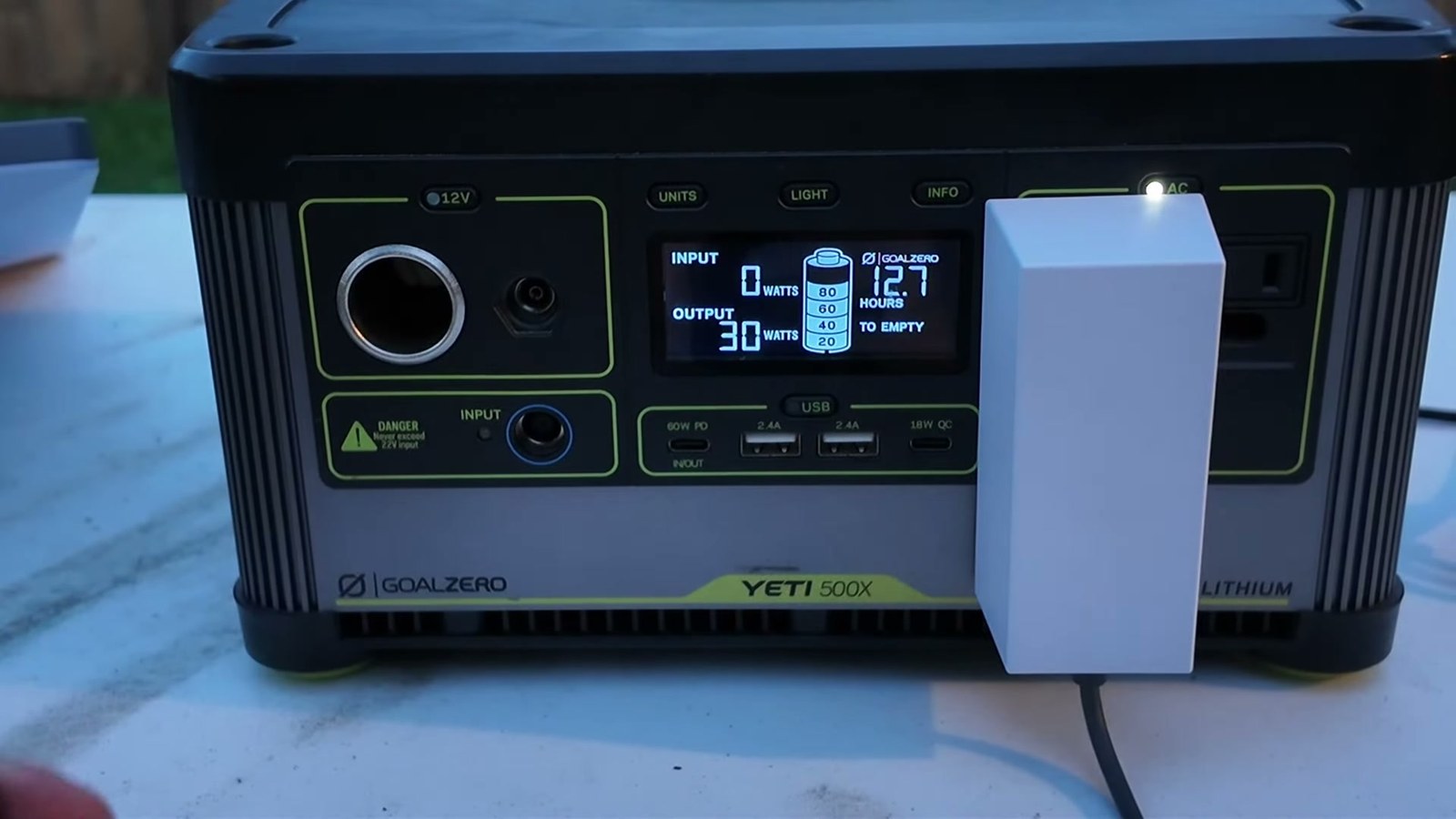
That matches the field. In a CC-licensed power test uploaded to Wikimedia Commons, a Goal Zero Yeti 500X running a Mini through its AC brick reads 30 W of output and 12.7 hours to empty.
The USB-C rule trips people up. Starlink: “You will need a USB Power Delivery (“PD”) source with a rating of 100W (20V/5A) for the Starlink Mini to operate optimally. Starlink Mini will not work with USB PD ratings below 65W (12-48V).” The dish only draws 30-odd watts, but Starlink sets a hard floor on the charger’s rating, so a 45 W phone charger will not run it and a 100 W one is what it asks for. Starlink sells a 5 m USB-C to barrel-jack cable for this; the USB-C end “should not be exposed to outdoor environments.”
Runtime from a battery is then just capacity divided by draw. An Anker Prime 26,250 mAh bank holds 99.75 Wh, which is about 3.3 hours at 30 W or 2.5 hours at 40 W, before conversion losses that will shave some off. A 500 Wh class station is a working day: the Yeti 500X in the frame above reads 12.7 hours at 30 W, and that reading, not the simple division, is the number to plan on. A 12 V car socket also works because the dish accepts 12 to 48 V direct current; the kit’s own supply is “110VAC or 12-48VDC, 60W.”
Good Wi-Fi inside a cabin: travel routers and the 2-in-1 cable
Every Mini owner hits the same problem at a remote cabin. The dish needs a clear view of the sky, so it lives outside. Its built-in Wi-Fi is rated for “Up to 112 m² (1,200 ft²)” and is Wi-Fi 5. Through a log wall or a metal roof, that coverage collapses, and you end up with a great signal by the window nearest the dish and nothing in the back bedroom.
The fix is to bring the network inside on a wire. The Mini has “One (1) Latching Ethernet LAN port with Starlink Plug.” Run that Ethernet indoors to a travel router, and the router does the Wi-Fi from the middle of the cabin, where the walls are on your side. Starlink supports exactly this: “You can replace the Starlink router with a third-party router. To do this, simply connect the third-party router behind the Starlink router and use the Starlink app to enable bypass mode.” Bypass mode turns off the dish’s own Wi-Fi so your router is the only network. For the Mini specifically, Starlink says: “We recommend using the official Starlink Mini ethernet cable to maintain the Mini’s weatherproofing.”
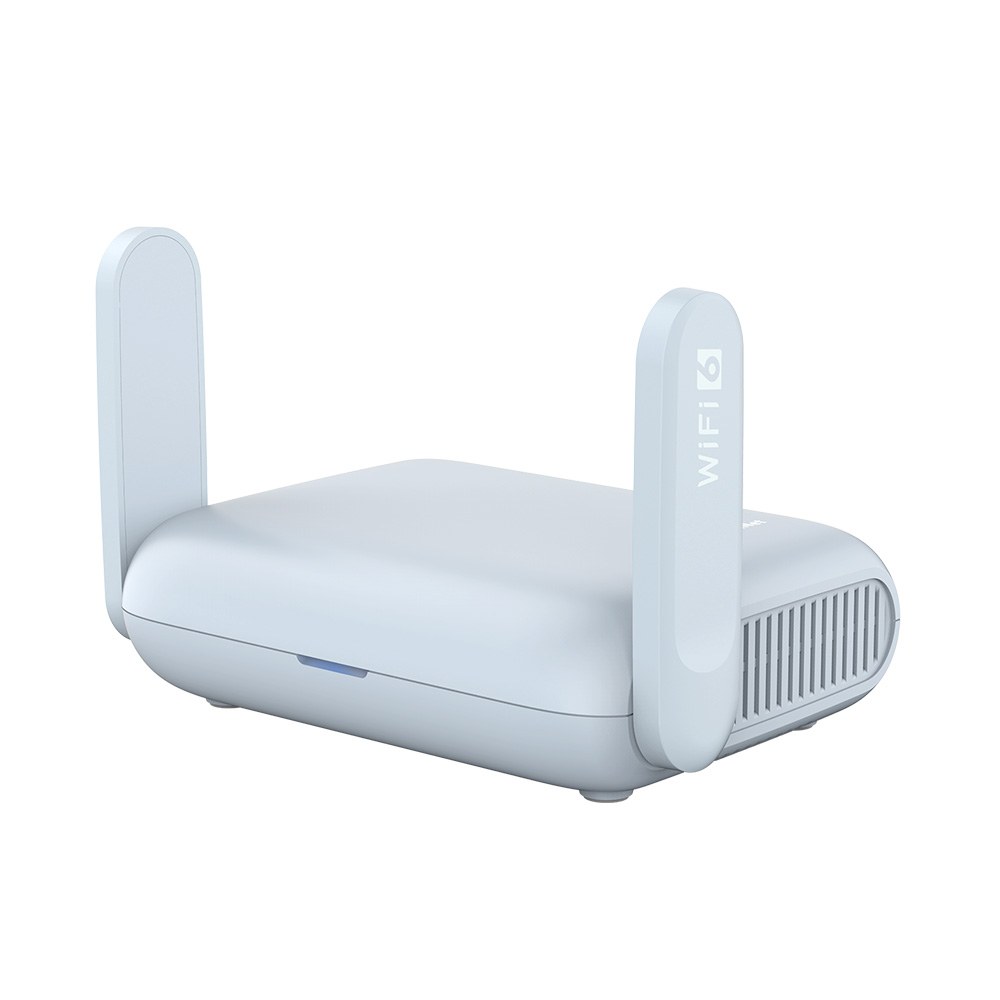
A pocket router such as the GL.iNet Beryl AX does this job: Wi-Fi 6, a “2.5G Multi-gigabit WAN port and a 1G gigabit LAN port,” and a Type-C power input rated 5 V/3 A, so a phone charger runs it. Plug the Mini’s Ethernet into its WAN port, flip bypass mode in the Starlink app, and the cabin has one normal network. The trade-off Starlink states up front: “we cannot guarantee performance or compatibility with third-party networking equipment, and some features of the Starlink app may not work as expected with a third-party router.” Starlink’s official answer to the same problem is its Router Mini, a Wi-Fi 6 unit rated “Up to 120 m^2 (1300 sqft)” that ships in the Mini X kit and works as a mesh node with the Mini.
The cable that makes this tidy is a third-party “2-in-1”: one weatherproof lead that carries power (USB-C Power Delivery or the barrel jack) and Ethernet data to the dish, so the router indoors feeds both. Owners use them precisely so a single cable goes through the window gap. Two caveats. First, the official cable-routing page says: “we do not recommend using any third-party cables as it may cause water damage to your Starlink. Any damages to your Starlink kit caused by the above may void your Starlink warranty. Use at your own risk.” Second, the Mini “is no longer rated IP67 with a standard RJ45 cable” plugged into its Ethernet port, per the spec sheet. If you run a 2-in-1, make sure its dish-end connectors seat with their seals and keep the USB-C end dry indoors.
Mounting: tripod, pole, roof, or just the ground
You do not need a tripod. The kit includes a kickstand, and Starlink says the Mini “comes with everything you need to get online, including a detachable kickstand that can used for quick setup or permanent installation.” On a campsite that means setting it on the ground, a picnic table, or a car roof, aimed with the app’s alignment tool. The dish has a 110° field of view and “Software Assisted Manual Orienting,” so you point it once and it tracks satellites electronically from there.
When trees or a cabin roof block the sky, you go up. The kit also includes “a Mini Pipe Adapter and Flat Mount, designed to attach to any existing pole with a diameter between 31 mm (1.25 in) and 50 mm (2 in).” That pipe adapter is what tripod owners use: a standard camera or light-stand tripod, a third-party aluminum puck with a 1/4”-20 thread, and the dish sits at head height in a clearing. Starlink lists its own Mini-specific mounts on the Starlink Shop and notes “mounts are specific to Starlink Mini (not compatible with other kits).”
Roof-of-the-car use is allowed on the right plan. Starlink’s in-motion page says “Starlink Roam, Local Priority, and Global Priority plans support in-motion use up to 100 mph (160 km/h) in authorized locations,” and the Mini is on the supported-hardware list. Two rules travel with that: “In-motion use is not permitted on any Residential plan,” and the same page warns that “Improper installation or use may cause injury, property damage, or void your warranty if the equipment is damaged while moving.” Translation: laying the Mini on a glass roof at a trailhead is fine; driving with it requires a mount rated to hold it.
Cable length rarely limits you. The Mini ships with a “15m (49.2ft) detachable DC power cable,” and Starlink advises against splicing extensions: “we do not recommend modifying your cable or combining it with another cable to add length as we cannot guarantee the quality of service.”
Mini vs Standard 4 X vs V5: which Starlink should you buy?
Starlink has renamed its dishes and shipped a new one, so the names in old forum threads no longer match the store. The official decoder: “Starlink Standard Kit is now Standard 4 X. Starlink Standard with the Router Mini is now Standard 4,” and “Standard 4 refers to the same hardware many customers previously called ‘Gen 3 Starlink.’”
| Kit | Dish size and weight | Average power | Router | Best for |
|---|---|---|---|---|
| Starlink Mini | 298.5 × 259 × 38.5 mm, 1.10 kg | 25 to 40 W | Built-in Wi-Fi 5, 112 m² | Camping, road trips, battery power, outage backup |
| Standard 4 X | 594 × 383 × 39.7 mm, 2.9 kg | 75 to 100 W | Router 3, Wi-Fi 6, 297 m² | Full-time home service, “streaming, video calls, and gaming” |
| Starlink V5 | 384 × 306 × 34 mm, 1.1 kg | 35 to 50 W | Router Mini, Wi-Fi 6 | Home service in the areas where it is sold; “not intended for in-motion use” |
Starlink’s own comparison sums up the split: the Mini “is compact in size, portable, and recommended for basic internet applications,” while “Standard 4 X is recommended for high-demand everyday internet applications.” Both are phased arrays with no motors, both have kickstands, and the Standard dish simply has “a slightly larger surface area.”
The V5 is the one people are searching for as “Starlink gen 4” or “the new dish.” Starlink’s page lists it at 375+ Mbps peak against 400+ Mbps for the V4, with roughly half the power draw and a dish that weighs the same as a Mini. It “is currently available in select areas,” and Mobile Internet Resource Center, checking a Boise, Idaho ordering flow, saw it “showed as a rental option with a $349 upfront hardware charge,” with a $10-a-month rental fee still appearing beside it, and advised readers not to “read too much into the early pricing and availability details.” For a camper, the V5 changes nothing yet: it is a Residential dish, it is not approved in motion, it cannot be parked on Standby (“Standby Mode is not available for V5 hardware”), and it does not have the Mini’s built-in router or USB-C power path.
One more name to decode: the Mini X. It is not a new dish. Starlink: “This kit includes the Starlink Mini and a Router Mini,” and as of this writing it “is currently available in Argentina and Germany but, will launch in additional markets soon.” If you see a US listing for a “Mini X,” check the box contents; the dish inside is the same Mini.
Should you wait? No shipped successor to the Mini exists as of September 2, 2026, and Starlink’s kit-identification page still lists the Mini as a current “Rectangular terminal without a built-in motor for self-orientation and a kickstand mount,” alongside Standard 4, Standard 4 X, and Performance (Gen 3). One hint of a successor is a sighting, not a product: Mobile Internet Resource Center writes that “in the interview where the V5 was first glimpsed, a new Mini design was also seen sitting on the table,” with no name, date, or price attached. Buy the current one unless you are happy to wait on a rumor.
The referral: a free second month for new customers
Starlink runs a referral program that is “open to customers on an active Residential or Roam plan.” A new customer who signs up through a referral link gets “One month of free service applied to their second month when they sign up for Residential or Roam.” The referrer gets a service credit or, in the US, cash: “The amount depends on the country the person you referred signed up in, and is shown in your account (for example, $100 per successful referral in the US),” and rewards “are issued after your referee subscribes for two months.”
Disclosure: this site’s author is a Starlink Mini owner with a referral link, starlink.com/?referral=RC-DF-12924450-39421-92. Sign up through it and your second month is free; the site earns a referral reward. The catches from Starlink’s own page: the free month only applies “when they sign up for Residential or Roam through your unique referral link,” and “If you refer someone outside your country, you will be asked to complete a one-time identity check to keep receiving cash.”
What to order, and when to pause
Order the Mini kit from starlink.com on a Roam 100GB plan, use the 30-day trial window Starlink advertises on its plans page to test it in your own backyard, then pause to Standby the day you get home. Add a 100 W USB-C power bank if you hike in, a travel router and a 2-in-1 cable if you cabin, and a tripod only if your campsite has trees. The dish will spend eleven months a year costing you $10 and waiting for the next storm. Not sure the Mini is the right dish at all? The Starlink picker sorts Mini, V5, Standard 4 X, and Performance in six questions, and the dish decoder identifies whatever you already own.
Product links on this page are affiliate links; the site may earn a commission at no extra cost to you.
Sources (32)
- starlink.com Starlink Mini Kit (US product page)
- starlink.com Service Plans
- starlink.com Roam
- starlink.com Residential
- starlink.com Starlink Help Center: How does pausing service work?
- starlink.com Starlink Help Center: Can I use Starlink in-motion?
- starlink.com Starlink Help Center: How can I power my Starlink Mini?
- starlink.com Starlink Help Center: How much power does my Starlink need?
- starlink.com Mini Specification Sheet (PDF)
- starlink.com Starlink Help Center: What is bypass mode?
- starlink.com Starlink Help Center: Can I add a third-party router or mesh system?
- starlink.com Starlink Help Center: How much cable do I have and how do I route it indoors?
- starlink.com Starlink Help Center: Do I need a mount?
- starlink.com Starlink Help Center: Starlink Mini USB-C Cable
- starlink.com Starlink Help Center: Differences between Starlink Mini and Standard 4 X
- starlink.com Starlink Help Center: What happened to the Starlink Standard Kit names?
- starlink.com Starlink Help Center: What is the Mini X Kit?
- starlink.com Starlink Help Center: Differences between Starlink V4 and Starlink V5
- starlink.com Starlink Help Center: How do I refer people to Starlink?
- starlink.com Standard 4 X Specification Sheet (PDF)
- starlink.com Mini X Specification Sheet (PDF)
- rvmobileinternet.com Mobile Internet Resource Center: Starlink drops Roam 10GB plan, introduces $5/month Standby Mode
- rvmobileinternet.com Mobile Internet Resource Center: Starlink V5 has arrived
- satelliteinternet.com I tried Starlink's new Standby Mode
- thenextweb.com Starlink price increase, Standby Mode doubles to $10
- dyalrental.com Starlink Satellite (Mini) Broadband rental
- satphonestore.com Starlink Mini Rental
- help.netflix.com Netflix Help Center: How to control how much data Netflix uses
- support.zoom.com Zoom Support: System requirements and bandwidth
- starlink.com Starlink Help Center: What Starlink Kit do I have?
- gl-inet.com Beryl AX (GL-MT3000) product page
- commons.wikimedia.org Wikimedia Commons: Starlink Mini Overland and Camping Power Testing (Overland Calling, CC BY 3.0)



🦋 Discussion on Bluesky
Discuss on Bluesky