


A Starlink Mini needs fewer add-ons than the listings suggest, because the kit already includes a kickstand, a pipe adapter and flat mount, a 15 m (49.2 ft) power cable and a wall power supply. These are the add-ons worth paying for, by the job each one does.
- Power in a car, or from a power station: a 12-volt car adapter. Starlink’s own Mini Car Adapter is the one to get if your shop lists it; Starlink reviewer DISHYtech bought it for $45 and called it “a must have accessory.”
- Power from a battery pack: a pack with a 100-watt USB-C port, such as the Anker Prime Power Bank (26K, 300W), $229.99 on Anker’s site on October 1, 2026, with a $30 discount code showing.
- A tripod: the ORLNK SM04 tripod adapter, $19.99 from the maker.
- A vehicle mount: Starlink’s Mini Roof Rack Mount if your vehicle has a rack, or the Spigen Starlink Mini Car Mount ($74.99 from Spigen) to hold the dish against glass.
- A case: a foam-lined hard case if the dish rides in a truck bed or checked luggage. Skip Starlink’s Mini Travel Kit.
Starlink’s shop shows products and prices only after you sign in to a Starlink account, so the Starlink prices on this page are the ones named reviewers reported, with the date of each report. Check the shop for the current price and for what is in stock in your country.
Starlink Mini accessories at a glance
| Job | Pick | Price | Where to buy |
|---|---|---|---|
| Car or power station power | Starlink Mini Car Adapter (includes the 5 m Mini USB-C Cable) | $45 in DISHYtech’s January 2025 review | Starlink Shop; may or may not be listed |
| Battery pack | Anker Prime Power Bank (26K, 300W) | $229.99 at Anker on October 1, 2026, with a $30 discount code showing | Anker or Amazon |
| Tripod | ORLNK SM04 Tripod Adapter Mount | $19.99 at ORLNK | Amazon |
| Vehicle with a roof rack | Starlink Mini Roof Rack Mount | $55 in a December 2024 Mobile Internet Resource Center report | Starlink Shop; may or may not be listed |
| Under a glass roof or window | Spigen Starlink Mini Car Mount (STL100) | $74.99 at Spigen | Spigen or Amazon |
| Permanent vehicle install | Starlink Mini Mobility Mount | $45 in a December 2024 Mobile Internet Resource Center report | Starlink Shop; may or may not be listed |
| Hard case | MEKEET hard case for Starlink Mini | Check price on Amazon | Amazon |
| Wi-Fi indoors | Starlink Router Mini | $40 in DISHYtech’s June 2025 review | Starlink Shop; may or may not be listed |
Amazon alternatives when the Starlink Shop does not have it
Starlink’s own accessories may or may not be available in the Starlink Shop when you look: the shop is only visible after sign-in, the car adapter is sold “in select markets,” and reviewers have found items missing. These are the stand-ins on Amazon, with what backs each one.
| Starlink accessory | Amazon alternative | What backs it |
|---|---|---|
| Mini Car Adapter | STARGEAR 12-volt car adapter for Starlink Mini | Stargear is the brand DISHYtech names “if you can’t get the Starlink version.” Its cable does not detach from the plug. |
| Mini USB-C Cable | STARGEAR 6.5 ft USB-C to DC cable | 4WDTalk’s reviewer runs a Mini from a 100-watt USB-C power station with it and reports “around 8-10 hours.” |
| Mini Roof Rack Mount | ORLNK Roof Rack Mounting Kit | ORLNK lists it at $44.99 and says it fits square rails. No independent test was found for this guide. |
| Mini Travel Kit | MEKEET hard case | 4WDTalk’s description and 3.9 out of 5 score, covered in the case section below. |
| Router Mini | GL.iNet Beryl AX travel router | A third-party router used in bypass mode, covered in the Wi-Fi section below. |
Two cautions apply to every row. Starlink “only guarantees performance with the included Starlink power supply and cable,” and it says third-party mounts are not guaranteed to work. And for a USB-C cable, feed it from a 100-watt port: 4WDTalk says the Stargear cable needs a source “rated at 65W or higher,” but Starlink’s own figure for the Mini is “a minimum rating of 100W, 20V/5A.” There is no Amazon stand-in here for the bolt-down Mobility Mount; no reviewed alternative turned up.
What the Starlink Mini kit already includes
Open the box before you shop. Starlink’s specification sheet lists the dish with built-in Wi-Fi, a kickstand, a “Pipe Adapter and Flat Mount,” the 15 m power cable, a power supply and a plug for the Ethernet port. Starlink says the kit “comes with everything you need to get online, including a detachable kickstand that can used for quick setup or permanent installation.”
That covers two things sellers will try to sell you again:
- A ground stand. The kickstand does that job.
- A pole mount. The included pipe adapter is “designed to attach to any existing pole with a diameter between 31 mm (1.25 in) and 50 mm (2 in).”
The gaps are power away from a wall outlet, an Ethernet cable and a case. The Mobile Internet Resource Center notes the Mini “doesn’t come from Starlink with any direct 12v DC power cable options included,” and the specification sheet marks the Ethernet cable “not included.” For plans and yearly costs, see the Starlink Mini guide.
A 12-volt car adapter: the first thing to buy
Starlink’s Mini Car Adapter, if your shop has it
The Mini Car Adapter is a plug for a vehicle’s 12-volt socket plus a 5 m (16.4 ft) cable. Starlink says it is “designed to power your Starlink Mini on-the-go via USB-C, replacing the Mini 15m Power Cable and Mini Power Supply from the Starlink Mini Kit,” and that it works “with any standard automotive 12-24V auxiliary power outlet, commonly referred to as the car cigarette lighter.”
It is two accessories in one box. The kit contents are the “Mini Car Adapter, Mini USB-C Cable,” and the cable also works by itself from a strong enough USB-C port. (USB-C is the small oval connector on newer phones and laptops.) DISHYtech’s Colby Baber, who bought the kit from Starlink for $45, wrote that the Starlink version “is higher quality” than the third-party adapters he had used: “The cable is thicker, and the car adapter doesn’t feel cheap or plasticky.”
It works with a power station too. DISHYtech says the adapter “is designed to plug into cars, boats, RVs, and portable power stations.” Baber uses it in a Toyota RAV4 and also “with my Ecoflow River 2 power station for camping.” Because the adapter replaces the kit’s wall power supply, the dish runs from the station’s 12-volt socket without the wall adapter in the chain. The dish is a light load. Starlink’s help page says the Mini “will typically consume 20-40 watts on average (15 when Idle.),” and its specification sheet lists “Average: 25-40W.” For how long a given station lasts, see the runtime table in the Starlink power outage guide and the sizing steps in what size power station you need.
If the Starlink adapter is not in your shop
It may not be. Starlink’s help page says the adapter “is currently only available in select markets.” In the comments under his review, a reader reported finding only the USB-C cable in the shop, and Baber replied: “I believe Starlink is either sold out, or has stopped making it. It hasn’t been on the shop in awhile now even for me in the US.” That reply is undated, so sign in and look before you plan around it.
There are two fallbacks:
- Starlink’s Mini USB-C Cable plus a USB-C car charger. Starlink’s help pages describe the cable as a shop accessory. Asked whether an aftermarket 12-volt charger would work with it, Baber answered, “Yes, as long as it outputs 20V/5A 100w.”
- A third-party 12-volt adapter cable. Baber suggests “checking out the Stargear Mini 12V Adapter if you can’t get the Starlink version,” and notes its cable does not detach from the plug.
Starlink’s caution covers both, and every other power source on this page: it “only guarantees performance with the included Starlink power supply and cable.”
Three things to know before you rely on a car socket
- Many car sockets switch off with the ignition. Baber found the Mini shut down at every stop and “took about 5 minutes to boot back up.” His fix was a small battery pack that can charge and discharge at once, placed between the socket and the dish.
- Keep the plug end dry. The barrel end of the cable makes a sealed connection at the dish, but “The USB-C end of the cable and Mini Car Adapter should not be exposed to outdoor environments.”
- A red light on the cable means stop. Starlink says red means “Your Mini Car Adapter is too hot,” and that it recovers once it cools. DISHYtech adds a second cause: the light also turns red when “the power source isn’t compatible with the Starlink Mini dish.” No light is normal.
A battery pack for the Starlink Mini needs a 100-watt USB-C port
This is the rule that catches people. Starlink: “To power your Starlink Mini, you will need a USB PD source with a minimum rating of 100W, 20V/5A.” USB PD is short for USB Power Delivery, the fast-charging standard that lets a USB-C port supply laptop-level power. The dish itself uses far less. The limit is in Starlink’s cable: if the port does not offer 20 volts at 5 amps, DISHYtech reports, “the status LED turns red, and the cable won’t deliver any power.”
Starlink’s help pages do not word the rule the same way. One says a 100-watt source is needed “for the Starlink Mini to operate optimally” and that the Mini “will not work with USB PD ratings below 65W.” Another calls 100 watts the “minimum rating” and says the Mini “will not work with USB PD ratings of 65W or lower.” Buy for the 100-watt figure, and check the rating of the single port, not the total printed on the box.
The rule is about USB-C ports. It does not apply to a 12-volt socket: Starlink’s own car adapter puts out about 60 watts, and Baber’s advice is that “For a 12V outlet or anything not USB-C, you don’t have to worry about USB-C PD requirements.”
Anker Prime Power Bank (26K, 300W). Anker lists two USB-C ports that each supply up to 140 watts, including the 20-volt, 5-amp setting Starlink asks for, in a pack that weighs 1.32 lb (600 g). Anker’s site showed $229.99 on October 1, 2026, alongside a $30 discount code the page said would end within days, so expect the price to move. DISHYtech ran a Mini from an older Anker Prime 20,000 mAh pack and reported “about 3-5 hours.” (mAh, or milliamp-hours, is the capacity printed on the pack.)
One caveat comes with it. Writing about the Anker Prime packs he owns, Baber warned: “when you plug in another device like a charger or a cell phone, the total input/output is shared. So it will reduce the power to the Mini and it will turn off.” He did not say which models, and no published test of the 26K pack with a Mini was found for this guide. If you buy it, run the dish from it alone, with nothing else plugged in.
Jackery Explorer 100 Plus, if you can find one. This is the pack with a reviewer’s hands-on backing. Baber uses a Jackery Explorer 100 as the in-between battery in his car and wrote, “I can only really recommend the Jackery 100 at the moment,” because it was the only pack he had that kept full power on one USB-C port while other devices were plugged in. The model Jackery lists in that size is the Explorer 100 Plus: 99.2 watt-hours, USB-C ports rated at 100 watts, 2.13 lb (965 g) and a $149 price. Jackery’s site marked it “Sold Out” on October 1, 2026, which is why it is not the main pick.
See the Explorer 100 Plus at Jackery
Either pack is for emergencies and short stops. Baber frames that kind of runtime as “enough to get connected so you can establish basic communication,” not days of streaming.
You also need the right cable. A plain USB-C cable does not fit the dish, whose power input is a round barrel jack. Starlink’s Mini USB-C Cable does the conversion, and it “requires a 100W 20V, 5A source.”
Mounts: tripod, glass, roof rack or bolted down
On a tripod: the ORLNK SM04 adapter
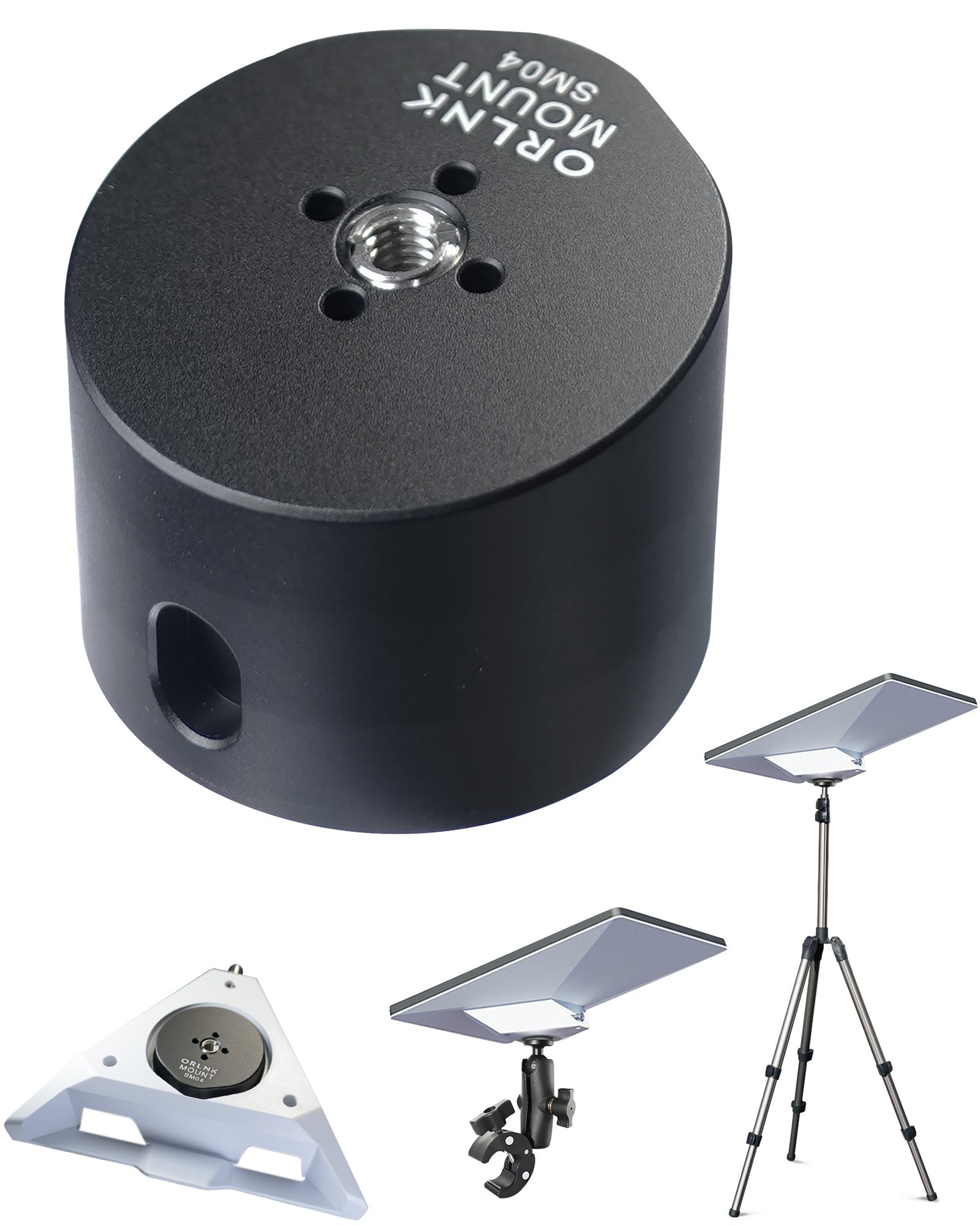
To put the dish on a camera tripod or light stand you need an adapter. The ORLNK SM04 is a small aluminum puck that fits the Mini pipe adapter from your kit and adds a threaded hole in the quarter-inch size camera tripods use, “for compatibility with tripods, clamps, ball mount, and more.” ORLNK says it is made “of one-piece premium aluminum alloy” and lists it at $19.99.
A tripod matters when the ground spot has trees or a roofline in the way and you need the dish a few feet higher. Check the fit note before ordering: ORLNK lists the SM04 for the “new version” Starlink Mini pipe adapter.
On a vehicle: match the mount to the roof
Driving with the dish is allowed on the right plan. Starlink says “Starlink Roam, Local Priority, and Global Priority plans support in-motion use up to 100 mph (160 km/h) in authorized locations,” lists the Mini as supported hardware, and warns that “In-motion use is not permitted on any Residential plan.” Two more limits sit on the same page. In-motion use on land is prohibited in 12 countries it lists, including Mexico, Spain, Japan and South Korea, and “Pausing your service with Standby Mode is not intended for in-motion use.” Starlink also warns: “Improper installation or use may cause injury, property damage, or void your warranty if the equipment is damaged while moving.”
| Your vehicle | Mount type | What the sources say |
|---|---|---|
| Has a roof rack | Starlink Mini Roof Rack Mount | Fits racks “ranging in thickness from 12 mm (0.47 in) to 48 mm (1.9 in), with a maximum width of 88 mm (3.5 in).” Not for round bars. |
| Glass roof or big rear window | Suction mount inside, under the glass | For this spot DISHYtech prefers “one-piece designs with at least three suction cups.” |
| Metal roof, no rack | Magnetic mount | DISHYtech’s preferred method, but see Starlink’s warning below about metal. |
| Van or RV, dish stays put | Starlink Mini Mobility Mount | Bolts through the roof; Starlink says it “is designed to create a waterproof seal.” |
Roof rack: Starlink’s Mini Roof Rack Mount. It clamps to a rack you already have, and Starlink says you can “easily remove your Mini from the Roof Rack Mount when not in use.” The Mobile Internet Resource Center notes that a rack mount “usually means no holes to drill.” It is the mount DISHYtech recommends for racks: “It’s cheaper than many aftermarket options while offering higher build quality and better materials.” One limit is printed in capitals in Starlink’s guide: “NOT INTENDED TO BE MOUNTED TO ROUND PROFILE BARS.”
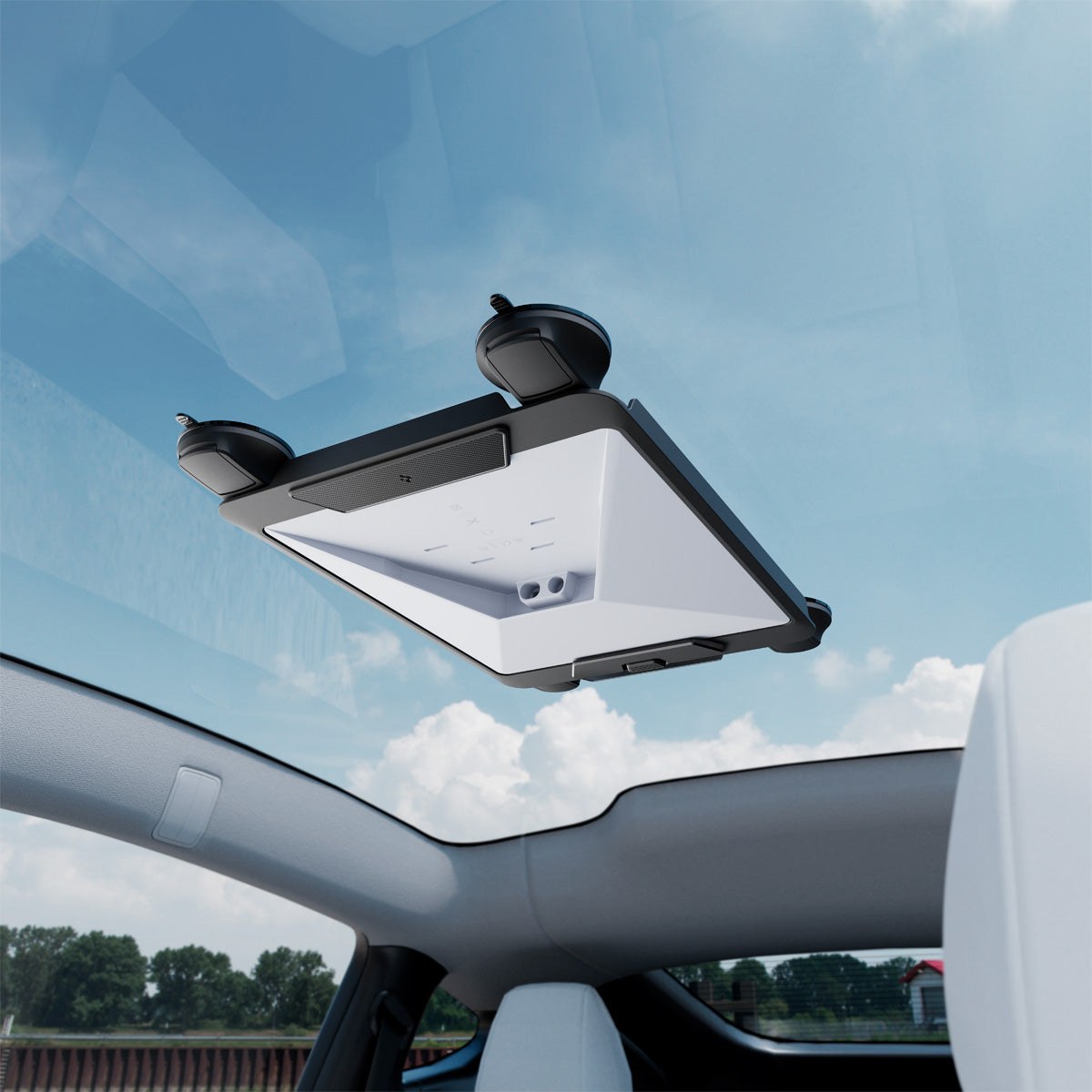
Under glass: Spigen Starlink Mini Car Mount (STL100). Spigen describes this as a mount “designed for reliable in-vehicle performance”: an open frame with “four gel-pad suction cups for exceptional stability on vehicle glass,” a handle latch for taking it on and off, and pads that reduce vibration noise. Spigen lists it at $74.99 with a 24-month limited warranty on the suction parts. No independent test of this exact mount was found for this guide, so treat it as a pick on design and warranty, not on a road test.
Does the dish work through glass? Baber mounted a Mini inside a Tesla Model Y, pointing up through the glass roof, and reported that “glass roofs don’t seem to impact performance or reliability at all.” Inside the car, he adds, “You don’t have to worry about rock chips, hail damage, or theft.”
Metal roof: read Starlink’s warning first. Magnetic mounts are popular, and DISHYtech’s overall recommendation is “a magnetic mount on the roof.” Starlink’s own position is more careful. It says third-party mounts are allowed but not guaranteed, and that “third-party metal mounts that wrap around the terminal’s base enclosure, or placing the terminal directly on metal, may interfere with GPS performance and are not supported.” (GPS is the Global Positioning System receiver the dish uses to know where it is.) Starlink puts that chip “at the top right back corner” of the dish and adds, “For optimal performance, we recommend using the Starlink mobility mount.” If you buy a magnetic or metal-framed mount, pick one that holds the dish off the roof and keeps metal away from that corner.
Permanent: Starlink’s Mini Mobility Mount. For a van or recreational vehicle (RV) where the dish stays on the roof, this is the bolt-down option. Starlink says it is built for “permanently mounting to wood, fiberglass, metal, and plastic,” uses stainless steel fasteners, and holds the dish at a 9-degree angle. It does mean drilling holes.
Starlink mounts are sold per dish. Its help page says “mounts are specific to Starlink Mini (not compatible with other kits),” so a mount for the larger Standard dish will not fit. Stock also varies by country; DISHYtech allows for the case where the Starlink roof rack mount “isn’t available in your country.”
Cases: a hard case, and why to skip the Travel Kit
Starlink’s Mini Travel Kit is a bumper for the dish, a drawstring sleeve and a zip pouch. DISHYtech bought one and did not like it: “Overall, I can’t really recommend the Starlink Mini Travel Kit to anyone.” Baber paid $63 before Starlink cut the price to $45, and still called $45 “incredibly expensive for a couple of cheap nylon bags.” The one part he liked is the bumper, which he wished were sold separately.
MEKEET hard case for Starlink Mini. If the dish travels in a truck bed, on a roof rack or as checked luggage, a rigid case is the safer choice. 4WDTalk describes this one as “IP67-rated waterproof and dustproof protection in a rigid ABS shell” with foam cut to hold “the dish, kickstand, power adapter, pipe adapter, and cables.” (IP67 is a rating for dust-tight gear that survives a short dunk in water; ABS is a hard plastic.) The trade-off is weight. 4WDTalk’s reviewer puts it at “roughly 4 lbs empty,” scores it 3.9 out of 5, and says he does not carry it himself for that reason, preferring a soft case in a crowded truck bed.
If the dish only moves between a closet and a car trunk, a padded backpack does the job. The Mobile Internet Resource Center notes the Mini “can usually fit in a standard backpack with your laptop.”
Better Wi-Fi indoors: Router Mini or a travel router
The Mini’s built-in Wi-Fi is rated to cover “Up to 112 m² (1,200 ft²).” DISHYtech calls range the dish’s biggest performance problem: “The biggest issue with the performance is the Wifi range.”
Starlink Router Mini is the simple fix. It is a pocket-size Wi-Fi 6 router that joins the Mini’s network as a second access point (Starlink calls this mesh), and Starlink lists the Mini among the kits it works with. DISHYtech tested one for several days and wrote, “I can easily recommend it to anyone seeking an affordable solution to extend WiFi coverage in a home or RV,” at a price of $40 in that review.
A travel router is the alternative if you want your own network gear. The GL.iNet Beryl AX is a Wi-Fi 6 travel router with a “2.5G Multi-gigabit WAN port and a 1G gigabit LAN port.” GL.iNet also sells a newer Wi-Fi 7 model, the Beryl 7, if you want the latest. You connect the router to the dish by cable and turn on bypass mode, which Starlink says “allows you turn off the Starlink router and connect a third-party router directly to Starlink.” The Starlink Mini guide walks through that setup.
Either way, use the right cable at the dish. Starlink’s bypass page says: “We recommend using the official Starlink Mini ethernet cable to maintain the Mini’s weatherproofing.” The specification sheet is blunter about an ordinary network cable: “This product is no longer rated IP67 with a standard RJ45 cable.” Starlink sells that cable in a 15 m (49.2 ft) length.
Check the Beryl AX price on Amazon
What to skip
| Skip this | Why |
|---|---|
| A ground stand or pole clamp | The kit includes a kickstand and a “Pipe Adapter and Flat Mount.” |
| Starlink’s Mini Travel Kit | DISHYtech: “I can’t really recommend the Starlink Mini Travel Kit to anyone.” |
| A power bank or USB-C charger whose port is rated under 100 watts | For USB PD sources, Starlink asks for “a minimum rating of 100W, 20V/5A.” |
| Joining two cables to add length | Starlink’s cable page: “we do not recommend modifying your cable or combining it with another cable to add length.” It sells a 30 m (98.4 ft) Mini power cable instead. |
| A plain Ethernet cable left plugged in outdoors | The dish “is no longer rated IP67 with a standard RJ45 cable.” |
| Mounts made for the Standard dish | Starlink mounts “are specific to Starlink Mini (not compatible with other kits).” |
| A metal mount that wraps the dish | Starlink says it “may interfere with GPS performance.” |
| The Roof Rack Mount on round crossbars | “NOT INTENDED TO BE MOUNTED TO ROUND PROFILE BARS.” |
On third-party cables in general, Starlink’s cable page says it does “not recommend using any third-party cables as it may cause water damage to your Starlink,” and that resulting damage “may void your Starlink warranty.” That does not make every aftermarket cable a bad buy, but it does mean the risk is yours.
Starlink Mini accessory questions
What accessories does a Starlink Mini need? None to get online at home: the kit includes the dish, a kickstand, a pipe adapter and flat mount, a 15 m power cable and a wall power supply. For a vehicle or camping, the first add-on is a way to power it without a wall outlet, which is what a 12-volt car adapter does.
Can a Starlink Mini run from a power bank? Yes, if the power bank’s USB-C port is rated for 100 watts at 20 volts and 5 amps, and you use a USB-C to barrel-jack cable made for the Mini.
Does the Starlink Mini come with a mount? Yes. It comes with a kickstand plus a pipe adapter and flat mount for poles between 31 mm and 50 mm across.
Can you use a Starlink Mini while driving? On Roam, Local Priority and Global Priority plans, up to 100 mph in authorized locations. It is not permitted on Residential plans, and Starlink lists 12 countries where in-motion use on land is prohibited.
Does a Starlink Mini work through a glass roof? DISHYtech ran one inside a Tesla Model Y under the glass roof and reported that glass roofs “don’t seem to impact performance or reliability at all.”
Where do you buy official Starlink Mini accessories? In the Starlink Shop, which is for existing Starlink customers and requires signing in to see products and prices.
Sources (28)
- starlink.com Mini Accessories Guide (PDF)
- starlink.com Starlink Mini Kit (US product page)
- starlink.com Mini Specification Sheet (PDF)
- starlink.com Starlink Help Center: How can I power my Starlink Mini?
- starlink.com Starlink Help Center: Starlink Mini USB-C Cable
- starlink.com Starlink Help Center: Do I need a mount?
- starlink.com Starlink Help Center: Can I use Starlink in-motion?
- starlink.com Starlink Help Center: How much cable do I have and how do I route it indoors?
- starlink.com Starlink Help Center: What is bypass mode?
- dishytech.com Starlink Mini 12V Car Adapter Review
- dishytech.com Starlink Mini Travel Kit Review
- dishytech.com Starlink Emergency Kit, Powering the Mini with a USB-C power bank
- dishytech.com Best Vehicle Mounting Locations for Starlink Mini
- dishytech.com My Starlink Mini Review After 6 Months
- dishytech.com Starlink Router Mini Review
- rvmobileinternet.com Mobile Internet Resource Center: New Official Starlink Accessories
- 4wdtalk.com Best Starlink Mini Accessories for 2026 (Tested)
- orlnk.com SM04 Tripod Adapter Mount for Starlink Mini
- orlnk.com Roof Rack Mounting Kit for Starlink Mini
- spigen.com Starlink Mini Car Mount (STL100)
- anker.com Prime Power Bank (26K, 300W)
- jackery.com Explorer 100 Plus Portable Power Station
- gl-inet.com Beryl AX (GL-MT3000) product page
- starlink.com Starlink Help Center: Starlink Mini Car Adapter
- starlink.com Starlink Help Center: Can I use third-party mounts with my Starlink?
- starlink.com Starlink Help Center: What are the supported power sources on Starlink Mini?
- starlink.com Starlink Help Center: What is the Starlink Shop?
- starlink.com Starlink Help Center: What USB power rating do I need to power my Starlink Mini?



🦋 Discussion on Bluesky
Discuss on Bluesky