

The right battery for a Starlink Mini depends on how many hours you need and whether the battery has to travel with the dish. These are the picks by job, with each maker’s US price:
- A battery that mounts on the dish: the PeakDo LinkPower 3, 99 watt-hours (Wh), $249. The LinkPower 1 holds the same 99 Wh for $169.
- A power bank that also charges a laptop: the Anker Prime Power Bank (26K, 300W), $229.99, or the Anker Laptop Power Bank (25K, 165W), $119.99. Either one also needs Starlink’s $31 Mini USB-C Cable.
- A night, a day or longer: the Bluetti Elite 30 V2, 288 Wh, $299.99, or the Bluetti Elite 100 V2, 1,024 Wh, $499. Bluetti expects both to ship in December.
- Tool batteries you already own: the PeakDo Power Dock, $79, made in DeWalt, Makita and Milwaukee versions.
Plan on roughly 2 to 4 hours from a 99 Wh battery, not the 4.5 to 5.5 hours in the listings. The table shows where that comes from. Prices are from each maker’s US store on November 18, 2026; sale prices change. Everything here is for the first Starlink Mini; the Mini 2 section covers the new dish.
Starlink Mini battery runtime table
| Job | Battery | Capacity | Maker price | Estimated hours, at 40 W to 20 W | Maker’s own figure |
|---|---|---|---|---|---|
| Mounts on the dish | PeakDo LinkPower 3 | 99 Wh | $249 | 2.1 to 4.2 | 5.5 hours at 20 W |
| Mounts on the dish, cheaper | PeakDo LinkPower 1 | 99 Wh | $169 | 2.1 to 4.2 | 4.5+ hours at 20 W |
| USB-C power bank | Anker Prime Power Bank (26K, 300W) | 99.75 Wh | $229.99, plus the $31 Starlink cable | 2.1 to 4.2 | None for a Mini; Anker says 30 to 45% is typically lost in conversion |
| USB-C power bank, cheaper | Anker Laptop Power Bank (25K, 165W) | 90 Wh | $119.99, plus the $31 Starlink cable | 1.9 to 3.8 | None for a Mini; Anker says about 63 to 70 Wh is usable |
| A night or a day | Bluetti Elite 30 V2 | 288 Wh | $299.99 | 6.1 to 12.2 | 14.5 hours for a 12 W Wi-Fi router |
| Multi-day | Bluetti Elite 100 V2 | 1,024 Wh | $499 | 21.8 to 43.5 | 18 hours for a 40 W fan |
| All-in-one case | Star-Batt Mini | 576 Wh | $1,099 | 12.2 to 24.5 | Up to 24 hours |
| Tool batteries you own | PeakDo Power Dock with two DeWalt 5 Ah packs | About 180 Wh (two packs, 18 V × 5 Ah each) | $79 for the dock | 3.8 to 7.7 | None published |
The estimated hours are a calculation from published numbers, not a test. This site did not test these batteries. Each estimate is the maker’s capacity × 0.85 ÷ the dish’s draw. The draw is Starlink’s own figure: the Mini “consumes 20 to 40 W on average, and 15 W when idle.” For a 99 Wh battery that is 99 × 0.85 = about 84 Wh, which is 2.1 hours at 40 watts (W) and 4.2 hours at 20 W. The calculation section explains the 0.85 and why the makers’ figures differ.
Batteries that mount on the dish
PeakDo makes a line of flat battery packs built for the first Starlink Mini. The maker describes the pack as “Precisely engineered to match the Starlink Mini, fitting seamlessly to its contours.” PeakDo lists a direct current (DC) output of 15 to 21 volts (V) at up to 65 W on the LinkPower 3 and LinkPower 1, and Starlink gives the Mini’s power input as “12 to 48 V DC, 60 W.” The LinkPower 3 package includes a DC cable, and PeakDo says “the DC port for the Mini is separate from the USB-C” port, so the pack feeds the dish without Starlink’s USB-C cable.
PeakDo’s LinkPower series has four of these packs. Three share the same 99 Wh capacity, so by this page’s calculation they run a Mini for the same time. What you pay more for is charging options and remote monitoring, and on the Ultra a thinner 22 mm pack with active cooling.
| Model | Maker price | Capacity | PeakDo’s runtime claim | Charges from | Weight |
|---|---|---|---|---|---|
| PeakDo LinkPower 1 | $169 | 99 Wh | 4.5+ hours | USB-C only | About 645 g |
| PeakDo LinkPower 2 | $229 | 99 Wh | 5+ hours | USB-C, DC or magnetic DC, including the Mini’s own power adapter | About 667 g |
| PeakDo LinkPower 3 | $249 | 99 Wh | 5.5 hours | USB-C, DC or magnetic DC, including the Mini’s own power adapter | About 677 g |
| PeakDo LinkPower Ultra | $329 | 99.9 Wh | 5.5 hours | USB-C, DC or magnetic DC | About 663 g |
PeakDo states every one of those runtime claims at a 20 W draw. Its LinkPower 3 and LinkPower Ultra pages call the figure “measured” in one place and “calculated” in another.
PeakDo LinkPower 3: the one to get if you want to recharge it in place
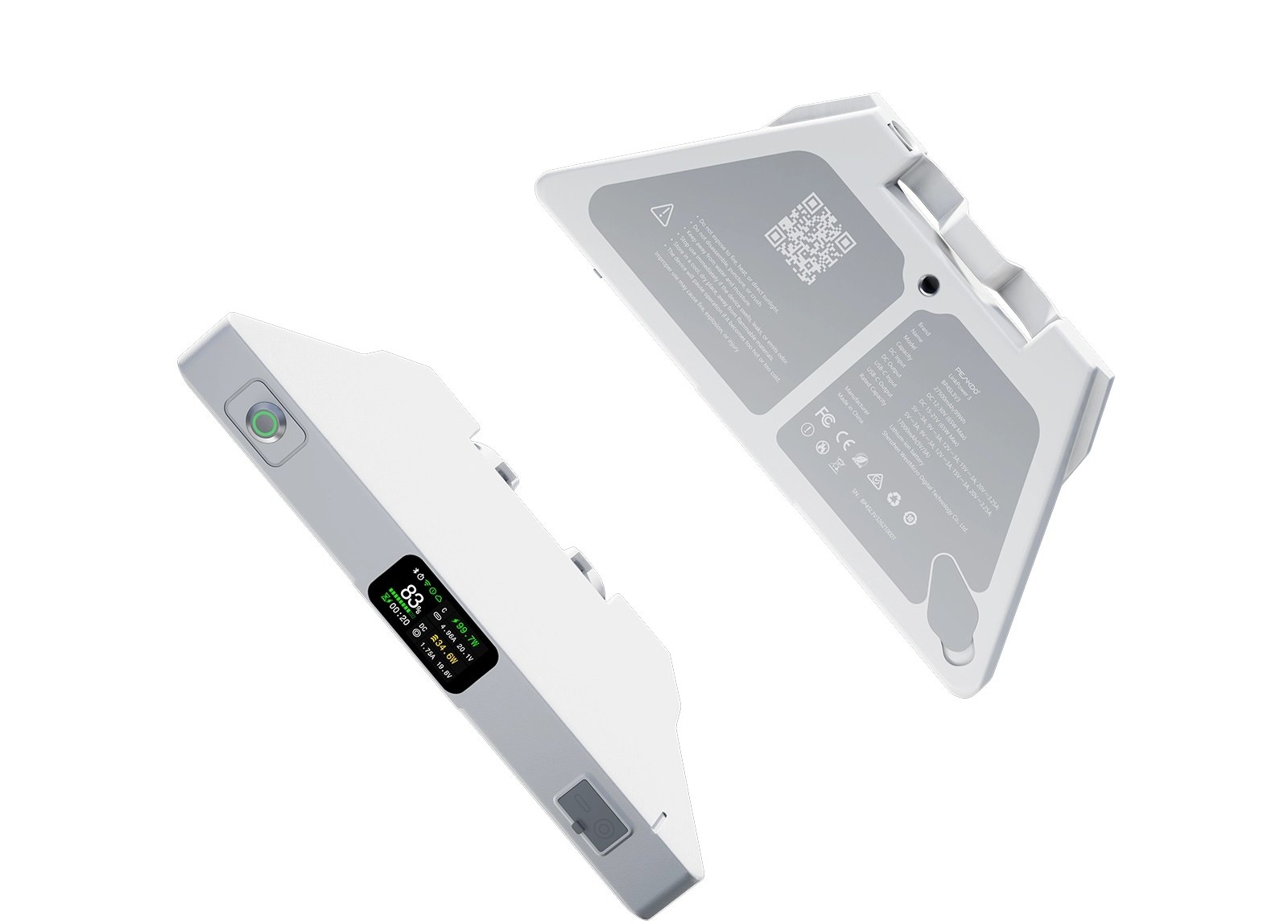
The LinkPower 3 is a 99 Wh pack that weighs about 677 g and measures 243 × 115 × 27 mm. It has a quarter-inch tripod hole, a small screen for battery level and an IP65 rating, a standard code for dust-tight gear that stands up to water jets. You can check it over Wi-Fi or Bluetooth from PeakDo’s app.
The reason to pay for it over the LinkPower 1 is charging. The LinkPower 3 takes power over USB-C, a DC port or a magnetic DC port, and PeakDo says “All DC ports compatible with the original Starlink Mini adapter.” That means the wall adapter from your Mini kit can refill it. With bypass on, PeakDo says, “external power will feed the Starlink Mini directly. This occurs if the battery is very low and charging slowly.”
PeakDo’s runtime claim is “Up to 5.5 hours on a full charge,” with the note “Runtime measured at 20W Starlink Mini power consumption.” Check that against the capacity: 99 Wh spread over 5.5 hours is an average of 18 W. That is between Starlink’s 15 W idle figure and the 20 W low end of its average range. The same PeakDo page gives a wider range elsewhere: “Starlink Mini consumes approximately 15-30W of power. With a 99Wh battery, it can provide around 3.3-6.6 hours of runtime.” Treat 5.5 hours as the best case for a dish that sits nearly idle, and 2 to 4 hours as the plan for a dish in use.
The LinkPower 2 is still sold, at $229. It has the same capacity, bypass mode and charging ports, with Bluetooth but no Wi-Fi.
PeakDo LinkPower 1: the same 99 Wh for $80 less
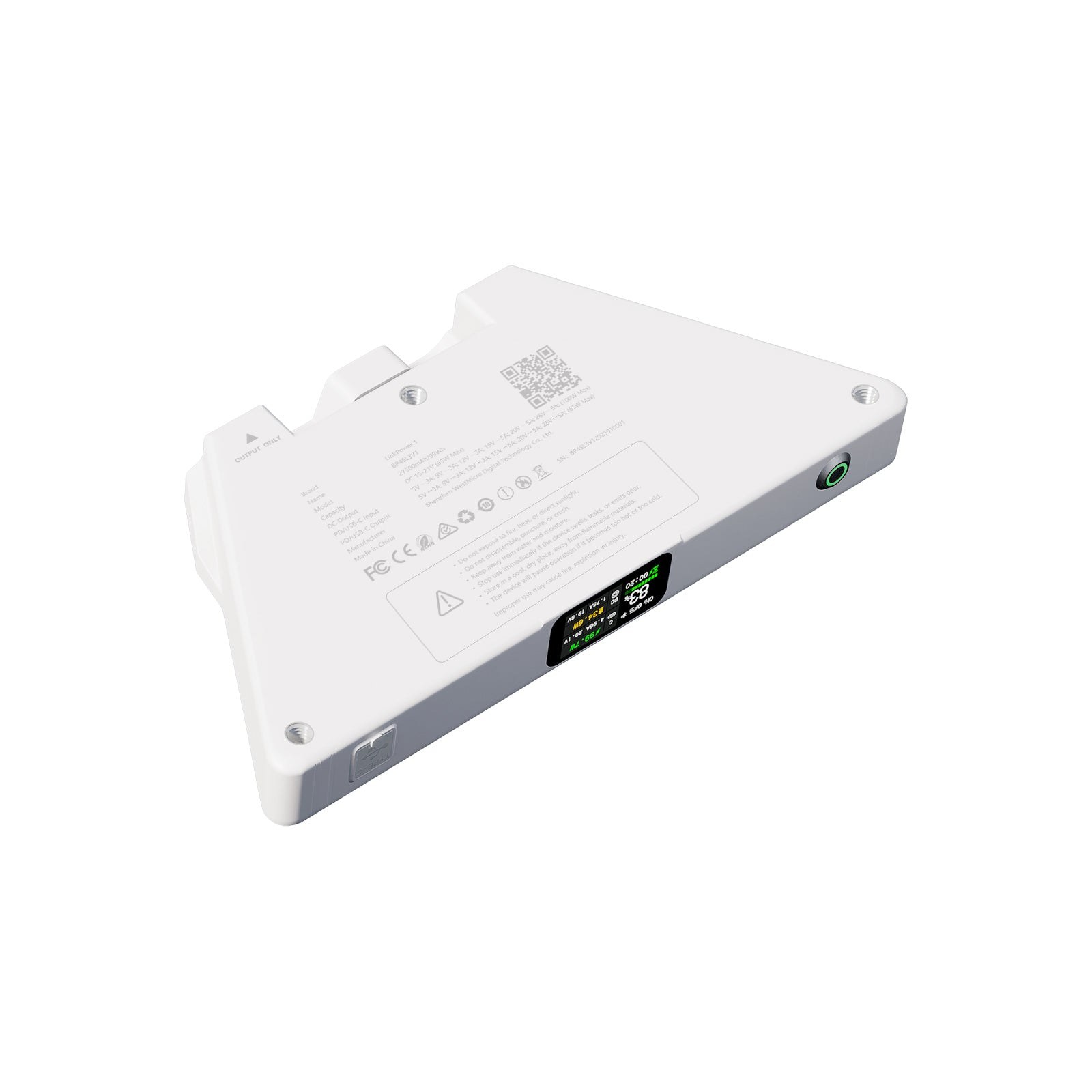
The LinkPower 1 is the cheaper dish-mounted pick, with matching specs where it counts: the same 99 Wh, the same 15 to 21 V output at up to 65 W, the same IP65 rating and the same 243 × 115 × 27 mm size, at about 645 g. PeakDo’s claim for it is “Up to 4.5+ hours on a full charge,” measured at the same 20 W.
What you give up is in PeakDo’s comparison table. The LinkPower 1 charges over USB-C only, its row for the Starlink Mini power adapter reads “Not Compatible,” and it has no bypass mode. If you will top it up from a USB-C charger between outings, that costs you nothing. If you want to leave it on the dish and recharge it from the Mini’s own adapter, buy the LinkPower 3, or the LinkPower 2, which PeakDo also lists as compatible with the Mini’s power adapter.
USB-C power banks: buy for the 100 W port
A general power bank can run the dish and still charge a laptop the rest of the year. It has to clear one rule first. Starlink: “Use a USB Power Delivery source rated 100 W, 20 V at 5 A. 100 W is the minimum.” USB Power Delivery (USB PD) is the fast-charging standard that lets a USB-C port supply laptop-level power. Starlink adds that the Mini “will not run on a USB Power Delivery supply rated below 100 W.”
You also need Starlink’s cable. The 5 m Mini USB-C Cable has a barrel plug at the dish end, and it costs $31 in the Starlink Shop. Keep the USB-C end indoors or under cover: Starlink says, “Do not expose the USB-C end of the cable to outdoor environments.”
Anker Prime Power Bank (26K, 300W)
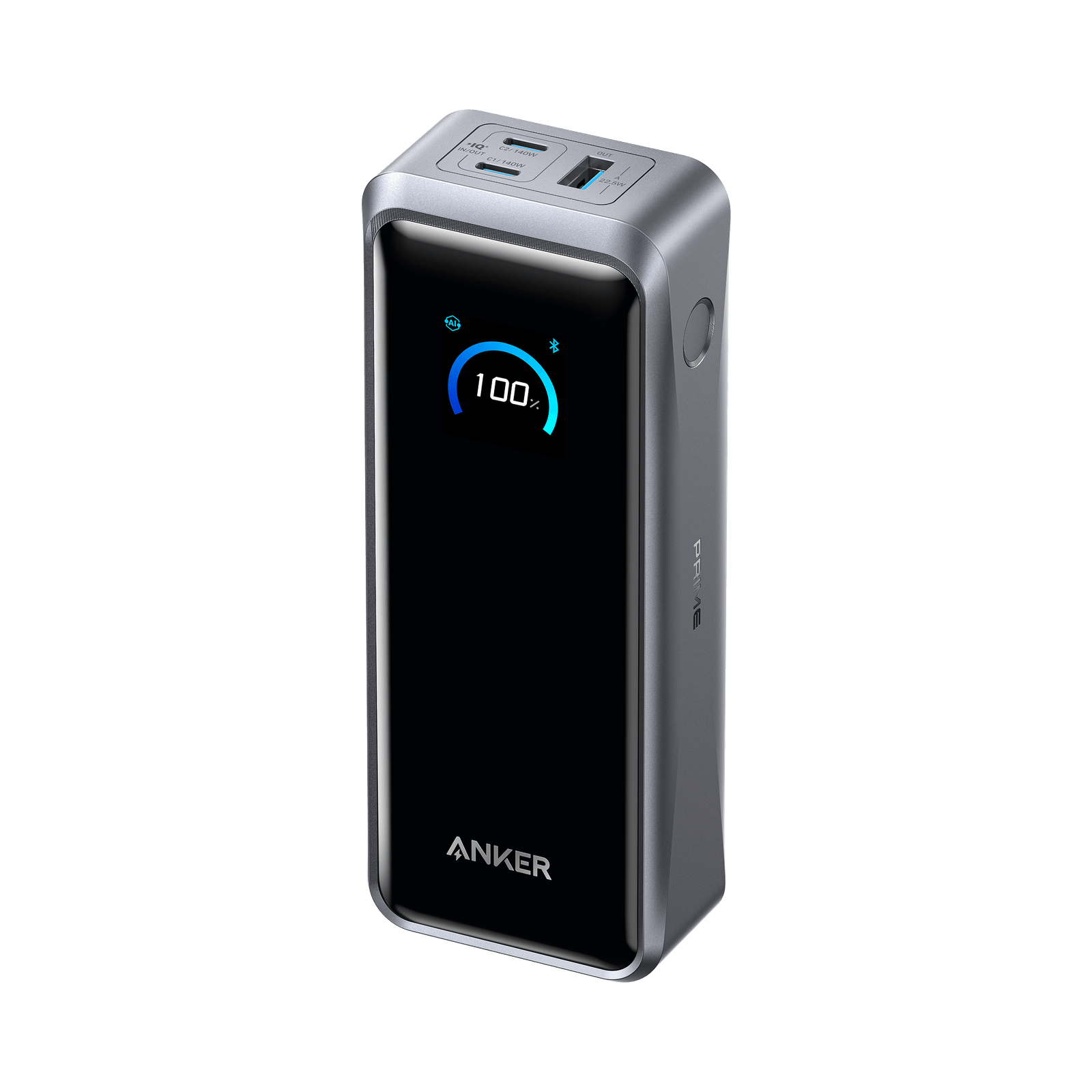
Anker lists this pack at 26,250 mAh (99.75 Wh), with two USB-C ports that each supply up to 140 W, including the 20 V at 5 A setting Starlink asks for. (mAh, or milliamp-hours, is the capacity figure printed on most power banks.) It weighs 1.32 lb (600 g) and costs $229.99.
Anker publishes no runtime for a Starlink Mini. Its product page does say that “Some energy loss (typically 30 - 45%) is normal during power conversion.” Anker gives that figure for charging devices in general, not for a dish. If the same loss applied to a dish, 99.75 Wh would deliver about 55 to 70 Wh, which is 1.4 hours at 40 W and 3.5 hours at 20 W. That is lower than the table’s 85 percent estimate, so plan on the low end.
Anker Laptop Power Bank (25K, 165W): the cheaper power bank
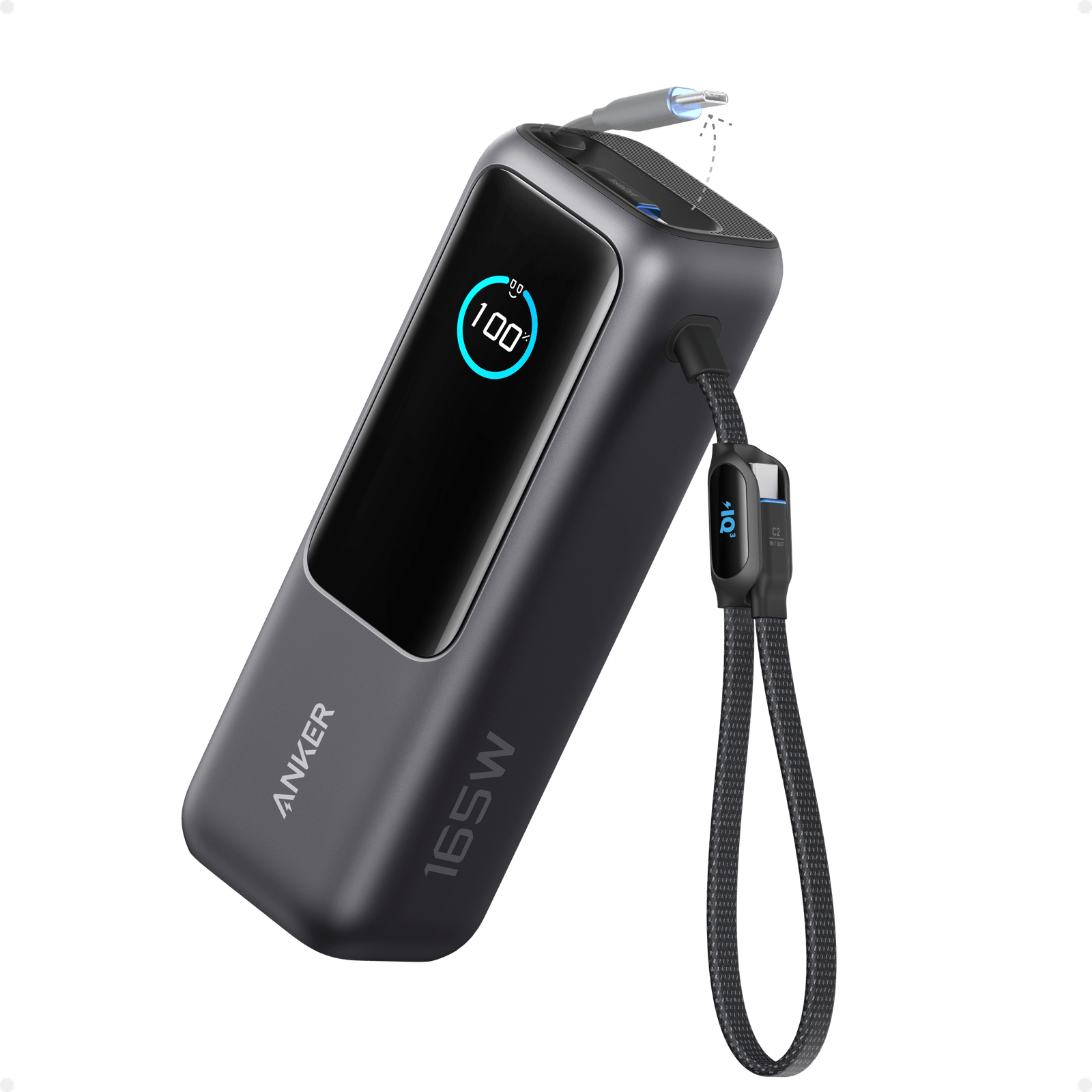
At $119.99, this is $110 less than the Prime, and its USB-C output still reaches 20 V at 5 A, 100 W. That is Starlink’s minimum with nothing to spare. It holds 25,000 mAh, which Anker rates at 90 Wh, and weighs 21.0 oz (595 g).
Anker’s page gives a figure for what comes out: “usable output is about 63 - 70Wh, depending on the device, cable, and charging protocol.” On those numbers a Mini gets 63 ÷ 40 = about 1.6 hours at its top average draw and 70 ÷ 20 = 3.5 hours at its lowest. The same page’s questions section gives a wider loss, a “30% to 45% capacity reduction,” which would leave about 50 to 63 Wh, so treat 1.6 hours as optimistic at full draw.
The spec to watch is the total. The pack’s ports share 165 W, and two ports cannot both hold 100 W inside a 165 W total. No published test of this pack with a Mini was found for this guide.
Run the dish from the power bank alone
A shared power budget is the detail that turns a dish off. Colby Baber of the Starlink review site DISHYtech, replying to a reader under his car adapter review, wrote of his own Anker Prime power banks: “when you plug in another device like a charger or a cell phone, the total input/output is shared. So it will reduce the power to the Mini and it will turn off.” He did not say which Prime models he owns. In the same reply he wrote, “I can only really recommend the Jackery 100 at the moment,” because it “was the only power bank I had that would not share net power on at least one of the USB-C ports.” The Starlink Mini accessories guide covers that pack. With either Anker pack, plug in the dish and nothing else.
Power stations for a night, a day or longer
A power station is the answer once you need more than an afternoon. It is too heavy to hang off a dish, so it sits on the ground or in the car and feeds the Mini by cable. Both picks here have a 100 W USB-C port and a 140 W USB-C port, which clear Starlink’s 100 W rule with the Mini USB-C Cable, and a 12 V car outlet. Starlink’s other supported route is its Mini Car Adapter, $45 in the Starlink Shop. DISHYtech’s review of the adapter says it “also includes a 5m (16.4 ft) Mini USB-C cable,” so that route needs no separate cable.
Not sure how big to go? The power station sizing guide works through other loads, and Power Station Brands compares the makers on warranty and price per watt-hour.
Bluetti Elite 30 V2: a night or a day
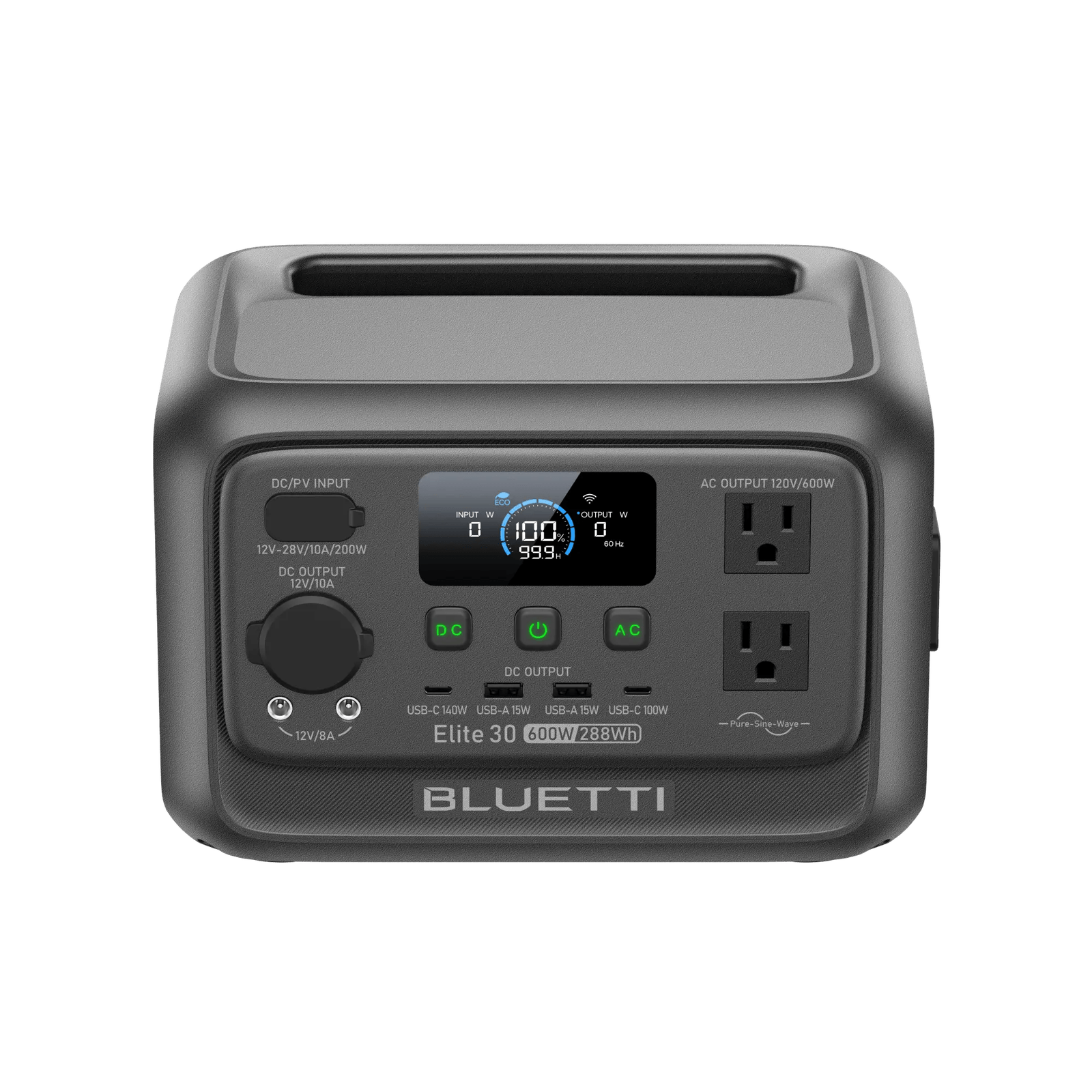
The Elite 30 V2 holds 288 Wh, weighs 4.3 kg (9.48 lb) and costs $299.99. The 85 percent estimate gives 6.1 to 12.2 hours of dish time. Bluetti’s own examples are mixed. Its page lists 14.5 hours for a “Wi-Fi Router (12W),” which is 12 × 14.5 = 174 Wh delivered, about 60 percent of the label, and 24.6 hours for a “Camping Light (10W),” which is 246 Wh, about 85 percent. At the router’s rate a Mini would get a little over 4 hours at 40 W and about 8.7 hours at 20 W. Plan somewhere between the two sets of numbers.
It is not shipping right away: Bluetti’s page says the Deep Gray model “is expected to ship in early December for orders placed on or after Nov. 5.”
Check the Elite 30 V2 price on Amazon · Check the Elite 30 V2 price at Bluetti
Bluetti Elite 100 V2: a long weekend
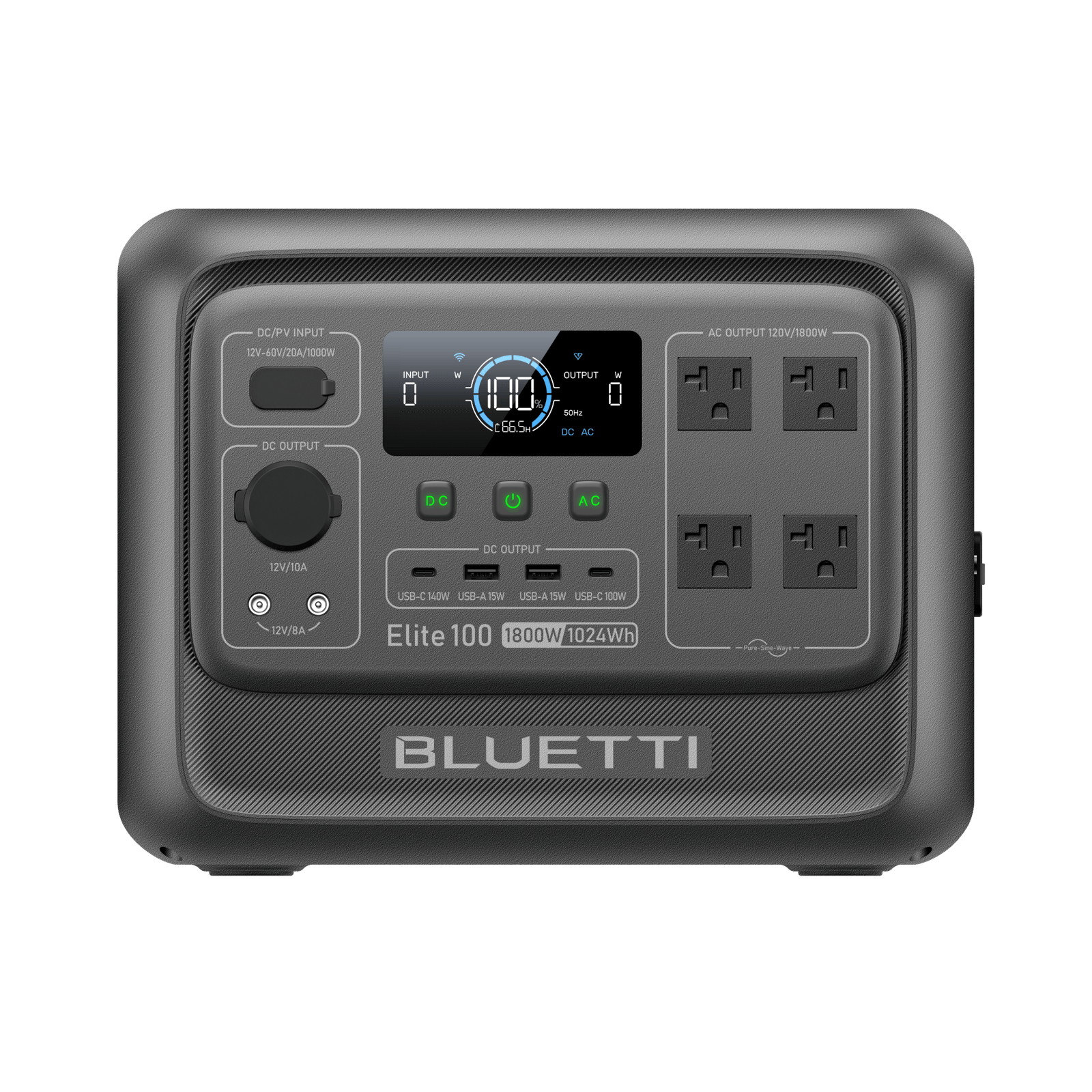
The Elite 100 V2 holds 1,024 Wh, weighs 11.5 kg (25 lb) and costs $499. Bluetti’s own example is the useful one here because it uses the Mini’s top average draw: 18 hours for a “Fan (40W).” That is 720 Wh delivered, about 70 percent of the label, against the 21.8 hours the 85 percent estimate gives at 40 W. Plan on Bluetti’s 18 hours of continuous use at full draw, and more if the dish spends time idle. At eight hours of use a day, 18 hours is a little over two days.
It is a preorder for now. Bluetti’s page says: “The Elite 100 V2 is expected to ship in mid-December for orders placed on or after Nov. 16.”
Check the Elite 100 V2 price on Amazon · Check the Elite 100 V2 price at Bluetti
For a home outage, the Starlink power outage guide has a runtime table for the bigger Starlink dishes too.
Star-Batt Mini: the dish and battery in one hard case
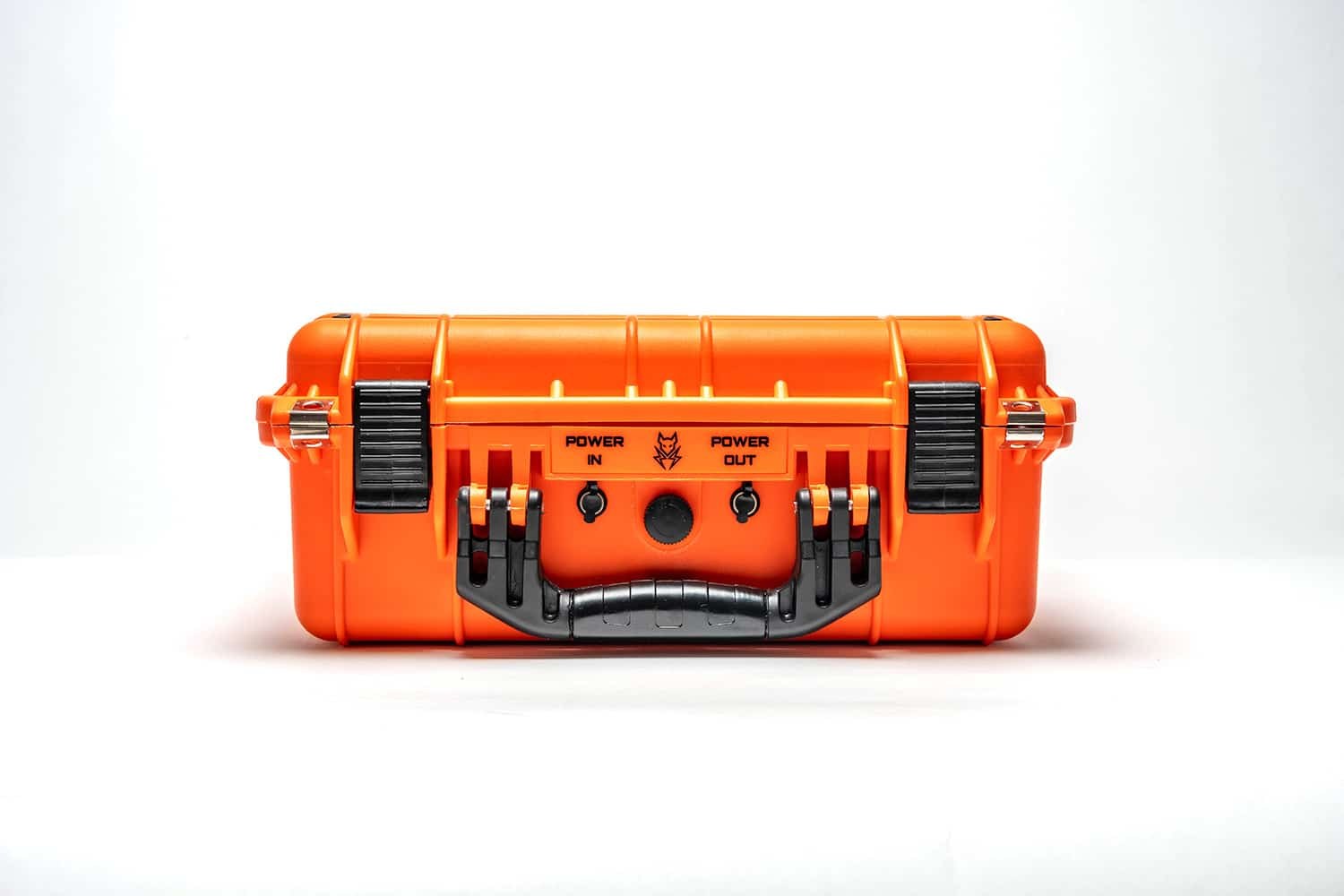
The Star-Batt Mini is a different kind of product: a hard case with a 576 Wh battery built in, and the dish works from inside it. Star-Batt says it is “Designed to transmit seamlessly inside our weatherproof case.” It costs $1,099, weighs 27 lb and is rated IP65, and the Starlink Mini is not included. Its output to the dish is 24 V at 60 W, inside Starlink’s 12 to 48 V input rating.
Star-Batt claims “Up to 24-Hour Battery Life on a single charge.” 576 Wh over 24 hours is an average of 24 W, so that claim fits a dish near the low end of Starlink’s range. The 85 percent estimate gives 12.2 hours at 40 W.
On watt-hours per dollar it loses badly to a power station: the Elite 100 V2 holds about 1.8 times the energy for less than half the price. What you are paying for is one sealed box to carry. Star-Batt ships the Mini to the lower 48 states only.
See the Star-Batt Mini at Star-Batt
Tool batteries: the PeakDo Power Dock
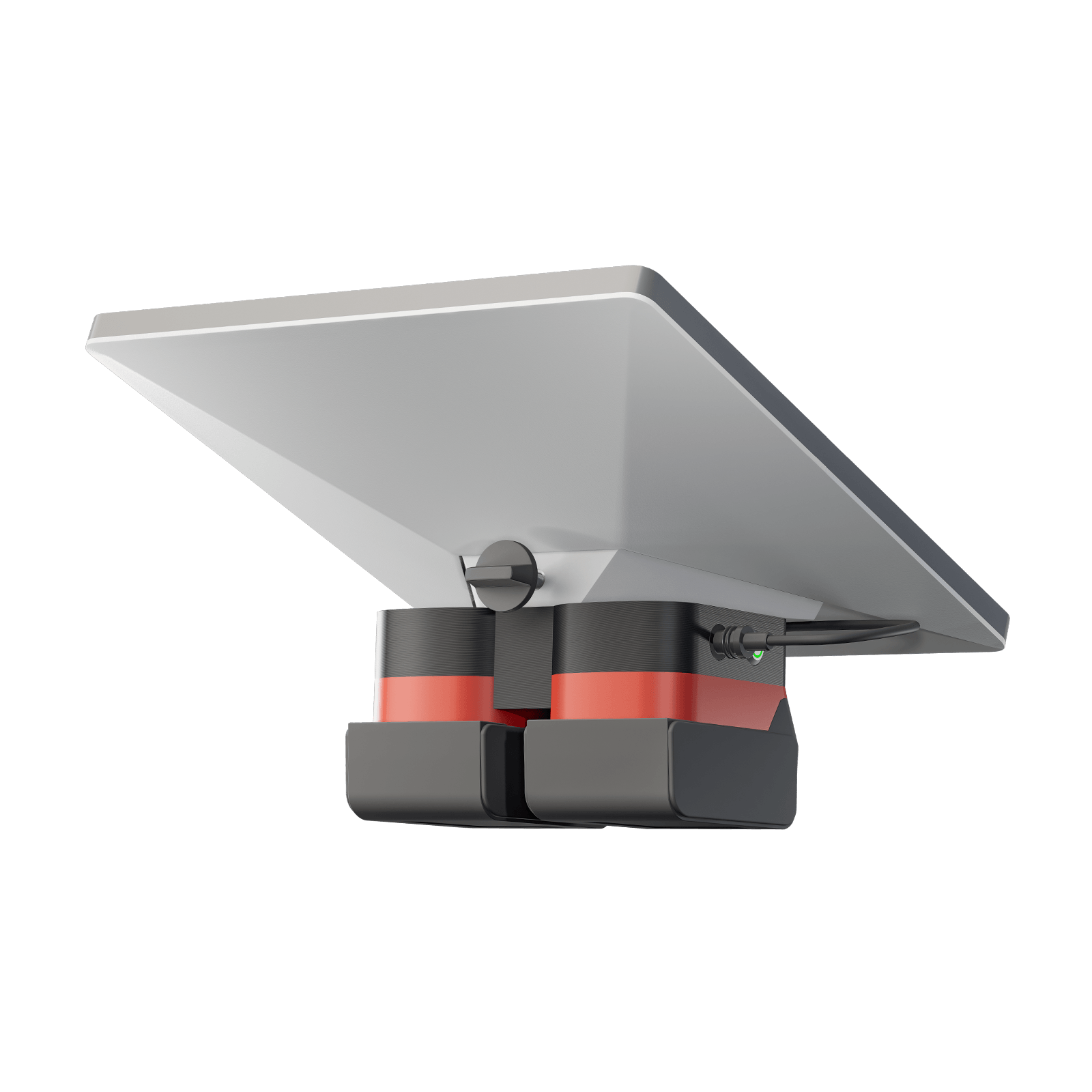
If your garage already holds a row of drill batteries, an adapter is the cheapest way in. PeakDo’s Power Dock is $79 and comes in separate DeWalt, Makita and Milwaukee versions, so order the one that matches your packs. PeakDo’s page does not say which DeWalt battery line the dock takes, so check the fit against your packs before ordering. It holds two batteries, and PeakDo describes it as “hot-swappable” with “low-voltage protection.” PeakDo also sells a four-battery dock at the same $79.
PeakDo’s page gives no output voltage, wattage or runtime for the dock, which is thinner than the spec sheets for its battery packs. The runtime depends on your packs. As an example, DeWalt’s DCB205 is a 5 Ah pack, and DeWalt notes that the “20V MAX” name is the maximum initial voltage: “Nominal voltage is 18.” 18 V × 5 Ah = 90 Wh a pack, so two hold about 180 Wh. With the same 85 percent allowance that is about 3.8 hours at 40 W and 7.7 hours at 20 W. No published test of the dock was found for this guide, so buy it for the packs you own, not as a reason to buy packs.
Check the DeWalt version on Amazon
The rules that catch people
- The 100 W rule is for USB-C. A USB-C source has to be rated 100 W at 20 V and 5 A, and Starlink names 65 W supplies as too small. The rule does not cover the dish’s DC input, which Starlink rates at 12 to 48 V and 60 W. The PeakDo packs (15 to 21 V) and the Star-Batt case (24 V) put out a voltage inside that range.
- Check the port, not the box. A power bank’s headline number is the total across its ports. The Anker Laptop Power Bank’s 165 W is a total; each USB-C output tops out at 100 W.
- A phone cable will not fit the dish. The Mini’s power input is a barrel jack, and Starlink’s Mini USB-C Cable “requires a 100 W, 20 V, 5 A source.”
- Starlink backs only its own power gear. Its help page says Starlink “only guarantees performance with the included Starlink power supply and cable.” Every battery on this page is a third-party power source.
- Flying: 100 Wh is the line. The Federal Aviation Administration (FAA) says lithium-ion batteries “are limited to a rating of 100 watt hours (Wh) per battery,” that spare batteries and power banks “must be carried in carry-on baggage only,” and that up to two larger batteries of 101 to 160 Wh need airline approval. The PeakDo packs (99 Wh and 99.9 Wh) and both Anker power banks (99.75 Wh and 90 Wh) sit under 100 Wh. The two Bluetti stations are far over 160 Wh. Star-Batt says its Mini case “is NOT airline compliant” and points flyers to the Star-Batt Plus, on sale at $1,599, which splits the same 576 Wh across six 96 Wh batteries. Airlines add their own limits; the power bank airline rules page lists them.
Will these work with the Starlink Mini 2?
For short sessions you will not need them. The Starlink Mini 2 comes with its own 71 Wh battery, rated for “Up to 4.5 hours,” and its page says “Preorders now open by invitation for select US customers.” Starlink’s page gives no power draw for the Mini 2. 71 Wh over 4.5 hours is an average of about 16 W, below the 20 to 40 W Starlink gives for the first Mini, so treat 4.5 hours as a ceiling. The power input is different from the first Mini’s. Starlink’s comparison lists the Mini 2’s power as “Battery or USB-C” and the first Mini’s as “DC Power Cable,” and the Mini 2 charges over USB-C at 60 W.
For each kind of battery:
- Dish-mounted packs and the Star-Batt case are built for the first Mini. PeakDo shapes its packs to the first dish, and the Mini 2 body is a different size: 263 × 314 × 23.1 mm against 298.5 × 259 × 38.5 mm. These batteries also feed a DC barrel input that Starlink’s Mini 2 spec list does not show. Do not buy one for a Mini 2.
- USB-C power banks and power stations should carry over, since the Mini 2 charges over USB-C. Starlink’s page lists a 60 W USB-C charger and names no minimum rating for other sources. Use the 3 m USB-C to USB-C cable that comes with the Mini 2; Starlink’s barrel-plug Mini USB-C Cable is for the first Mini only. Starlink says you can “Stay online while the battery charges, or swap in a spare Mini 2 battery, sold separately.”
The first Mini is the one on general sale, “Starting at $149” on Starlink’s US page. The Mini 2 launch explainer compares the two dishes.
How the hours are worked out
The method is one line: capacity in watt-hours × 0.85 ÷ the dish’s draw in watts.
The draw. Starlink publishes two figures for the first Mini. Its help page says the dish “consumes 20 to 40 W on average, and 15 W when idle,” and its product page lists “Average Power Usage: 25 - 40W.” The table uses 40 W for the short end and 20 W for the long end.
The 0.85. No battery hands over every watt-hour on its label; some is lost as heat in the electronics. Jackery publishes a rule of thumb for its own power stations: “Working time = Explorer’s capacities * 0.85 / operating power of your device.” This page borrows that 85 percent as a planning allowance for every battery in the table. It is not a measured figure for any of them, and the makers’ own numbers show how far it can be off:
| Battery | What the maker publishes | What that implies |
|---|---|---|
| PeakDo LinkPower 3 | 5.5 hours at 20 W | 110 Wh delivered, more than its 99 Wh capacity |
| PeakDo LinkPower 1 | 4.5+ hours at 20 W | 90 Wh delivered, 91% of capacity |
| Anker Laptop Power Bank (25K, 165W) | 63 to 70 Wh usable | 70 to 78% of its 90 Wh |
| Anker Prime Power Bank (26K, 300W) | 30 to 45% typically lost | 55 to 70% of its 99.75 Wh |
| Bluetti Elite 30 V2 | 14.5 hours at 12 W | 174 Wh delivered, 60% of 288 Wh |
| Bluetti Elite 100 V2 | 18 hours at 40 W | 720 Wh delivered, 70% of 1,024 Wh |
| Star-Batt Mini | Up to 24 hours | 576 Wh would cover an average of 24 W |
Each maker measures in its own way, so these rows are not a ranking of efficiency. Read them one at a time: where a maker’s figure is lower than the table’s estimate, plan on the maker’s. Where it is higher than the battery’s own capacity allows at the stated draw, as with the LinkPower 3 and LinkPower Ultra, plan on the estimate.
For what a year of service costs on top of the hardware, see the Starlink Mini guide. For mounts, cases and the car adapter, see Starlink Mini accessories.
Starlink Mini battery questions
How long will a battery run a Starlink Mini? About 2 to 4 hours for a 99 Wh battery, by this page’s estimate: 99 Wh × 0.85 ÷ the 20 to 40 W Starlink says the dish draws on average. A 288 Wh power station works out to about 6 to 12 hours and a 1,024 Wh one to about 22 to 44 hours by the same method; Bluetti’s own example for the larger one is 18 hours at 40 W.
What size power bank does a Starlink Mini need? One with a USB-C port rated for 100 W at 20 V and 5 A, plus Starlink’s Mini USB-C Cable. Starlink says the dish will not run on a USB Power Delivery supply rated below 100 W.
Can you take a Starlink Mini battery on a plane? Under the FAA’s rules a spare battery or power bank of 100 Wh or less has to travel in carry-on bags, not checked ones, which covers the PeakDo packs and both Anker power banks on this page. The Bluetti power stations are too large, and Star-Batt says its Mini case is not airline compliant.
Can a DeWalt battery power a Starlink Mini? Yes, with an adapter such as the PeakDo Power Dock, $79, which is also made for Makita and Milwaukee packs. Two 5 Ah DeWalt packs hold about 180 Wh at their 18 V nominal voltage, an estimated 3.8 to 7.7 hours.
Does the Starlink Mini 2 need a separate battery? Not to get started. It has its own 71 Wh battery rated for up to 4.5 hours and charges over USB-C at 60 W, and Starlink sells spare Mini 2 batteries separately. Dish-mounted packs made for the first Mini are shaped for a different body, so do not buy one for a Mini 2.
Sources (23)
- starlink.com Starlink Help Center: How can I power my Starlink Mini?
- starlink.com Starlink Mini Kit (US product page)
- starlink.com Starlink Help Center: What USB power rating do I need to power my Starlink Mini?
- starlink.com Starlink Help Center: What are the supported power sources on Starlink Mini?
- starlink.com Starlink Help Center: Starlink Mini USB-C Cable
- starlink.com Starlink Shop: Mini accessories
- starlink.com Mini 2
- peakdo.com LinkPower 3 product page
- peakdo.com LinkPower 1 product page
- peakdo.com LinkPower 2 product page
- peakdo.com LinkPower Ultra product page
- peakdo.com Power Dock with Adapter product page
- peakdo.com four-battery Power Dock product page
- anker.com Prime Power Bank (26K, 300W)
- anker.com Laptop Power Bank (25K, 165W)
- bluettipower.com BLUETTI: Elite 30 V2 product page
- bluettipower.com BLUETTI: Elite 100 V2 product page
- star-batt.com Star-Batt Mini product page
- star-batt.com Star-Batt Plus product page
- ca.jackery.com Jackery: FAQ (runtime formula)
- dewalt.com DCB205 20V MAX 5Ah Battery
- faa.gov PackSafe, Lithium Batteries
- dishytech.com Starlink Mini 12V Car Adapter Review


Discussion on Bluesky
Discuss on Bluesky