


At a Glance
Rating: 8/10
Pros:
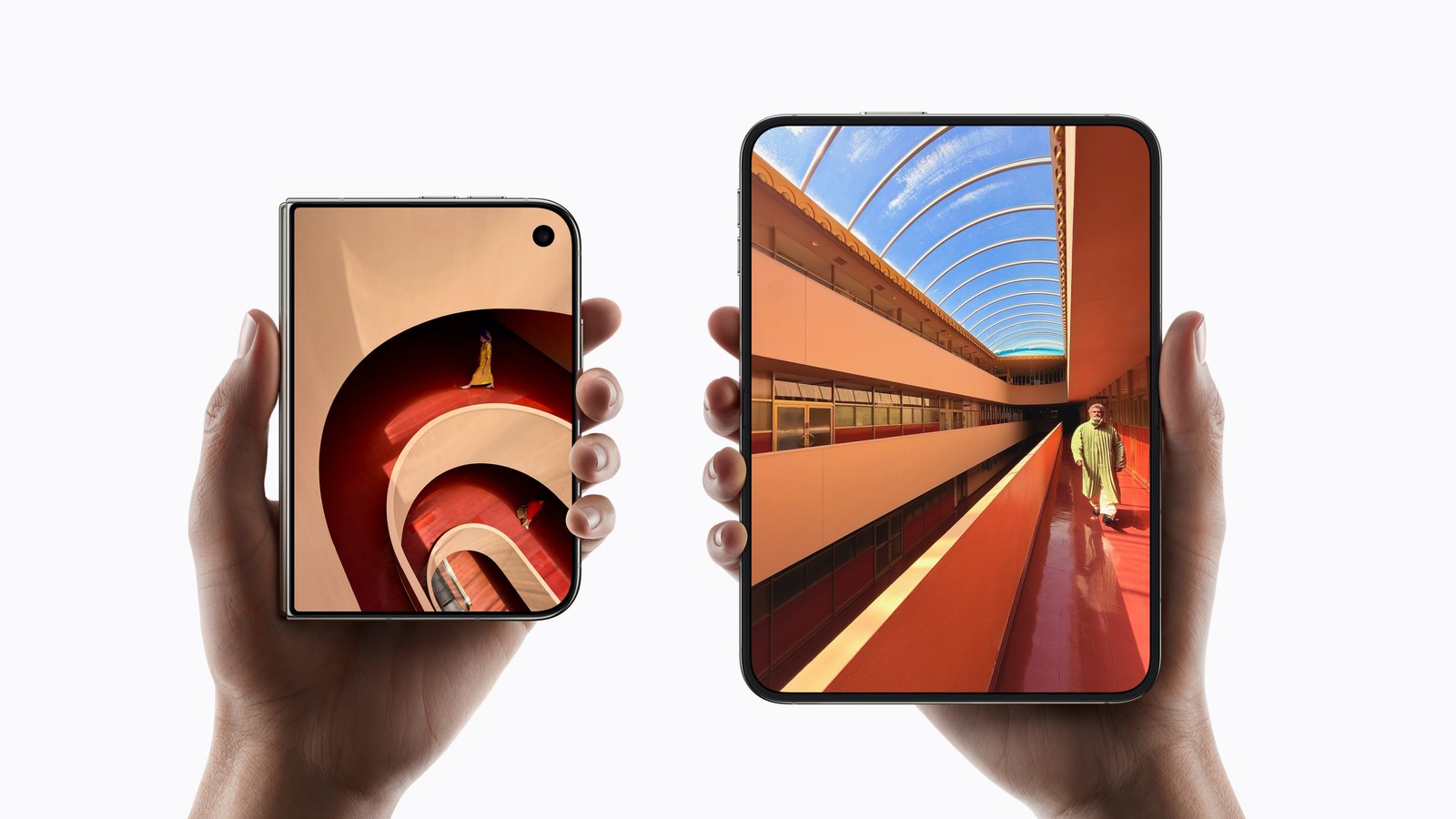
- A real change in iPhone design: a 5.4-inch phone that opens into a 7.6-inch screen
- The hinge on my unit opens and closes buttery smooth
- The nano-texture inner screen fights glare, and I can hardly see the crease
- The battery gets me through my day
Cons:
- The cameras feel like a step down from my iPhone 17 Pro Max, and there’s no dedicated telephoto lens
- Owners are reporting cracked inner screens, and Apple hasn’t explained why
- Apps use the screens inconsistently, even some of Apple’s own
- My 1TB configuration costs $2,599 before tax
Bottom Line: A great device in an early ecosystem. If you want something new and can afford it, it’s worth it. If you aren’t a tech enthusiast, waiting is reasonable.
Why I Bought One on Launch Day
I bought my iPhone Duo on launch day, October 23, in night sky with 1 terabyte (TB) of storage, and it replaced my iPhone 17 Pro Max. Night sky is one of the Duo’s two colors, alongside star white. To my eye, in person, it reads as a deep blue.
I haven’t been genuinely excited about an iPhone in years, and I love this one. This is an actual change, not another copy-paste iPhone. This year’s iPhone 18 Pro feels a lot like last year’s 17 Pro, which felt a lot like the model before it, even if the 17 Pro was more of a step. The Duo is different the moment you pick it up.
If you haven’t followed the launch: closed, the Duo is a phone with a 5.4-inch outer screen, and open, it’s a 7.6-inch screen that folds at the middle. It runs the same A20 Pro chip as the iPhone 18 Pro models and starts at $1,999 with 256GB. The full spec sheet and what the first lab reviews measured are in the iPhone Duo launch guide.
The Hinge, and the Cracked-Screen Reports
I was worried about the hinge going in. So far I’ve had no problems: mine opens and closes buttery smooth.
The worry is real, though. Over the weekend after launch, owners began reporting inner screens cracked along the hinge, the problem I’ve been calling Crackgate. iFixit, the repair site, describes owners “hearing a noise, and then seeing a small line extending down the fold and a bright line extending across the display,” and one owner had it happen “within six hours of buying the phone, another before they’d even finished setup.” 9to5Mac adds that while a number of the Reddit reports are legitimate, “there have been a handful of fake AI-generated reports as well.”
iFixit built a 3D model of the hinge from teardown footage, patents and CT scans and found that “the breaks cluster near the transition from the gap for the crossing flex cable to the central hinge support.” In its simulation, “the center support bar fails to drop far enough,” so the folding screen comes down onto it, creating a stress hotspot near where the breaks appear. iFixit calls that “one possible answer,” not a confirmed cause.
Apple’s response came on October 26. In a statement to 9to5Mac, Apple said “we are aware of an issue impacting the inner display on a small number of iPhone Duo units,” and that affected owners “should contact AppleCare for a replacement.” According to 9to5Mac, you don’t need AppleCare+ for that replacement, and if you bought from a carrier, you go to AppleCare directly rather than the carrier.
I’m glad Apple acknowledged it and is replacing units. But the statement doesn’t explain the cause, give a count beyond “a small number” of units or say whether a hardware fix is coming, and it offers replacements without mentioning a recall. One detail is somewhat reassuring for me: 9to5Mac reports that, according to Apple, the problem appears to surface relatively quickly, and mine has been fine since launch day. Teething problems are expected with a first-generation product, but this is a significant one, and I’m watching it.
If you crack the inner screen yourself, the costs are steeper. Apple’s estimate for inner display damage without coverage is $999. With AppleCare+, the inner display fee is $99, and AppleCare+ with Theft and Loss for the Duo costs $19.99 a month or $199.99 a year. The full comparison with carrier insurance is in the iPhone Duo repair cost guide.
The Nano-Texture Inner Screen
I really like the inner display and its nano-texture finish. Apple says the matte layer “reduces glare and reflections” and protects the inner display “from scratches and dents.” As for the crease, I can feel it every now and then, but with the screen on I can hardly see it. For me it’s a non-issue.
The finish does get oily. A slightly damp cloth wipes it clean pretty easily, which matches Apple’s cleaning page: it asks for a “soft, slightly damp, lint-free cloth,” such as a lens or microfiber cloth, says not to use cleaning products (outside its disinfecting steps) or compressed air, and warns that “Cleaning products and abrasive materials will diminish the coating and might scratch your iPhone,” meaning the phone’s oil-repellent coating. Apple also calls the cover layer “an integral part of the inner display” and says “Don’t attempt to remove it.” Engadget found the layer “can be removed if you pick at it too much,” so leave its edges alone. Apple’s estimate for cover layer damage is $49 without coverage, or $19 with AppleCare+.
Cameras: A Step Back From the 17 Pro Max
This is where I feel the trade-offs.
Rear cameras. The Duo has two 48-megapixel (MP) rear cameras, a Fusion Main and a Fusion Ultra Wide, and its zoom tops out at “2x optical‑quality zoom in,” a 2x crop from the main sensor. Tom’s Guide puts it plainly: the Duo “doesn’t have a telephoto lens.” My 17 Pro Max had a dedicated 48MP telephoto at 100 mm (4x) that also enables 8x optical-quality shots. I miss that telephoto, but the Duo’s cameras are fine for most situations.
Front camera. The outer screen’s selfie camera is a 12MP Center Stage camera; the 17 Pro Max’s is 18MP. It’s decent, but it isn’t up to the 17 Pro level.
Inner FaceTime camera. This one is a real step back, and I think Apple can do better. It sits under the inner display, and Apple doesn’t list its megapixels. Tom’s Guide calculated its selfies at 4.4MP, and the person on the other end of its test FaceTime call said the reviewer “looked fine but a bit grainy.” iFixit’s summary is blunter: “Reviewers say its photos are muddy.”
FaceTime on the Big Screen
The large inner screen is perfect for FaceTime calls, which makes the weak inner camera more frustrating. The hardware for a great video call is almost all there.
Group FaceTime uses a different layout on the Duo. I’m still getting used to it and haven’t decided whether I like it.
Battery Life
The battery gets me through my day fine, even coming from a 17 Pro Max. For a measured number, Tom’s Guide’s test, which surfs the web at 150 nits of brightness over 5G until the battery dies, ran the Duo for 13 hours and 20 minutes.
Software: iOS 27.2 Already Helped
The software is visually polished overall, but I’ve hit glitches in the system and in apps. Apple released iOS 27.1 for the Duo alone on its October 23 launch day. iOS 27.2 arrived on October 26, and it noticeably reduced the bugs I was seeing. I expect Apple to keep improving it.
iOS 27.2 also brought Apple Pencil support to the Duo, but only for the Apple Pencil (USB-C). 9to5Mac notes that “Apple Pencil Pro and other Pencil models aren’t supported.” The Pencil I already use with my iPad charges by sticking to its side, so it isn’t the USB-C model, and I haven’t tested the Duo with a Pencil. It would be nice if it worked.
Apps: Inconsistent, but Improving Fast
App optimization is inconsistent from app to app, even among Apple’s own apps. That’s a different experience from Engadget’s review, which found that Apple’s “first-party software doesn’t suffer from this shortcoming.” The biggest difference I notice is the sidebar on the right side of the screen: some apps flow content into it, and others ignore it.
Safari on the outer screen is one example of the space not being used yet. Apple’s WebKit team writes that iOS moves controls to the side of that wider, shorter screen, and “in Safari 27.1, web content does not currently extend to fill the space behind these controls.” The team says it is investigating a better approach and to “stay tuned,” without a date.
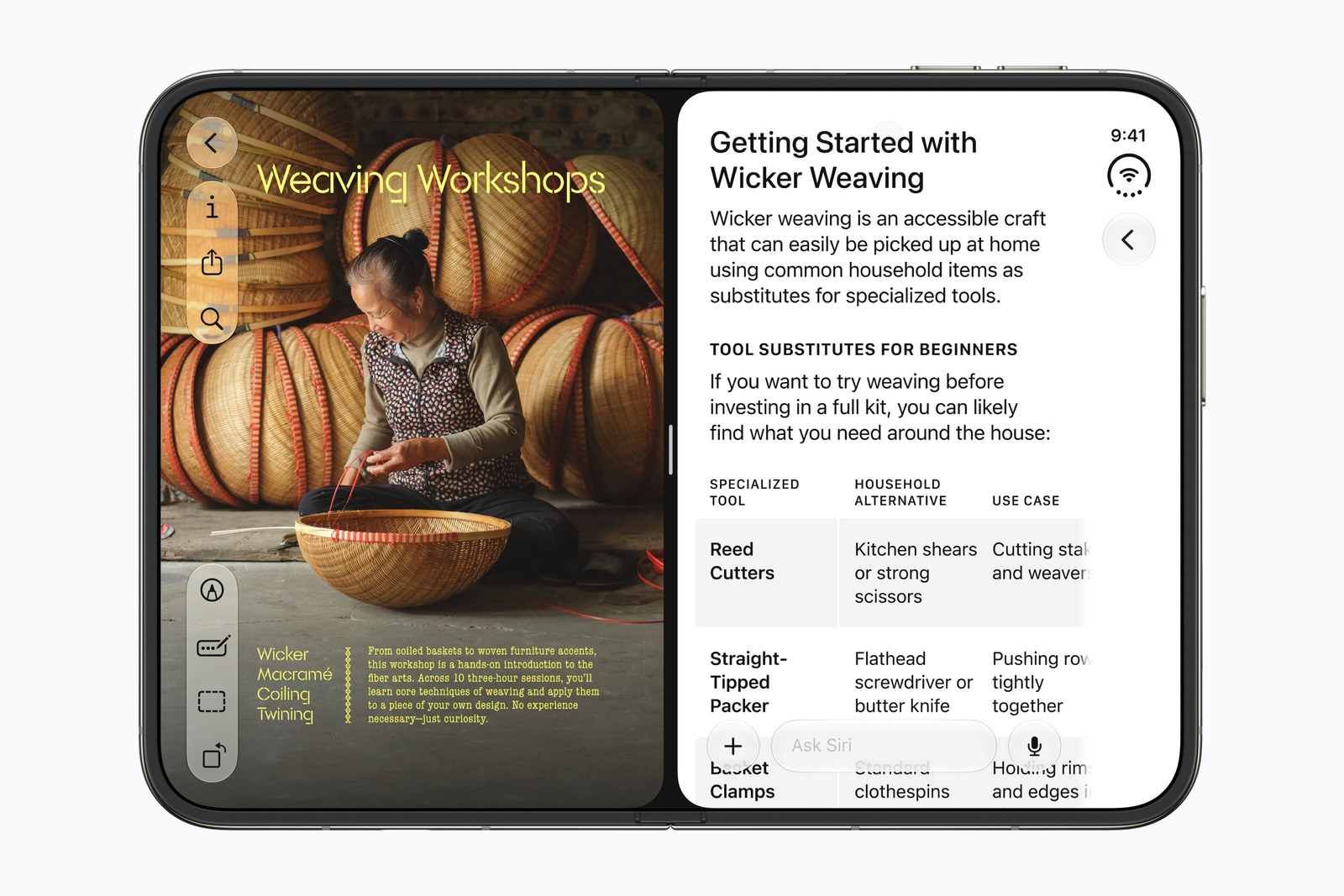
The good news is that apps are getting optimized quickly, sometimes from one day to the next. Apple’s own statement on the screen issue says developers are “rapidly updating their apps to take advantage of its unique form factor.” Apps that were already built to adapt well on iPad seem to have a head start. Apps built around a fixed iPhone layout need more work, though it doesn’t look like a massive lift. I hope shared best practices emerge, especially for the outer screen.
The Price
My configuration was about $2,600: Apple lists the 1TB Duo at $2,599, and the 256GB model starts at $1,999. That’s a little daunting. Carrier deals make it more manageable, and that’s how I made the number work.
If you’re deciding between the Duo and a regular flagship, the iPhone Duo vs iPhone 18 Pro Max comparison lays out the gap at every storage size. If you buy one, the MagSafe accessories that fit the Duo are worth a look before you add a case.
Who Should Buy It?
Buy it if:
- You have the money and want something new and exciting
- You’d use a screen that opens to 7.6 inches for reading, video, FaceTime or two apps at once
- You can live with Touch ID in the side button instead of Face ID
Wait if:
- You aren’t a tech enthusiast and want a phone that just works with every app
- You shoot a lot of zoomed photos and rely on a dedicated telephoto lens
- You want Apple to explain the inner-screen cracks before you spend this much
Frequently Asked Questions
Is a cracked iPhone Duo inner screen covered?
If your inner screen failed on its own, contact AppleCare, and Apple decides whether it’s the issue it acknowledged: its statement says owners with display issues “should contact AppleCare for a replacement.” 9to5Mac reports that you don’t need AppleCare+ for it, and that if you bought from a carrier, you contact AppleCare directly, not your carrier. Accidental damage is different: Apple’s estimate for inner display damage is $999 without coverage, or a $99 fee with AppleCare+.
Does the iPhone Duo work with Apple Pencil Pro?
No. Apple lists support for Apple Pencil (USB-C), which arrived with iOS 27.2, and 9to5Mac reports that Apple Pencil Pro and other models aren’t supported.
Does the iPhone Duo have Face ID?
No. It uses Touch ID built into the side button instead.
Final Verdict
Rating: 8/10
The iPhone Duo is a great device in an early ecosystem. The hardware feels ready, and the software and apps are catching up. The trade-offs (weaker cameras, early bugs, the price and the open questions about the inner screen) are worth it for me.
If you’re not a tech enthusiast, it may be worth waiting. If you have the money and want something new and exciting, the Duo might be for you.
These are my impressions after a few days, and there’s more to come as I keep getting acclimated. I’m already looking forward to the next version. Maybe it will have Face ID and cameras that are actually Pro. Maybe it’ll even be called the iPhone Ultra, who knows. That’s a wish list, not a forecast, but I’m excited to see what Apple has in store.
Sources (15)
- apple.com Apple Newsroom: Apple unveils iPhone Duo
- apple.com iPhone Duo tech specs
- apple.com iPhone Duo buy page
- support.apple.com Apple Support: iPhone 17 Pro Max tech specs
- 9to5mac.com Apple responds to reports of iPhone Duo inner display cracking
- ifixit.com iPhone Duo teardown
- support.apple.com Apple Support: Apple Service and Repair for iPhone (estimated service cost)
- apple.com AppleCare Fees and Deductibles
- apple.com AppleCare
- support.apple.com Apple Support: Apple security releases
- 9to5mac.com Apple releases iOS 27.2
- webkit.org WebKit Features for Safari 27.1
- support.apple.com Apple Support: How to clean your iPhone
- tomsguide.com Apple iPhone Duo review
- engadget.com Apple iPhone Duo review



🦋 Discussion on Bluesky
Discuss on Bluesky